Appearance
Genogram Creator
A genogram creator helps you build a proper family systems diagram in the browser without piecing together shapes and lines manually. EasyGenogram is an online genogram creator with standard clinical symbols, 50+ relationship types, and shareable links, so you can start building immediately without downloading software first.
CTA BUTTON: [TRY EASYGENOGRAM FREE]
Before You Start
- Browse Genogram Templates if you want a ready-made structure to start from.
- Check Genogram Symbols for the correct relationship and emotional connection markers.
- Read How to Make a Genogram for the full step-by-step process.
What's Included in This Genogram Creator?
[CARD DISPLAY FOR SKIMMABILITY]
- Drag-and-drop canvas: add people, connect them, reposition without redrawing.
- 50+ relationship types: structural lines for marriage, divorce, cohabitation, separation, and adoption; emotional lines for closeness, conflict, distance, cutoff, and enmeshment.
- Custom Emotional Connections: define your own relationship line with a custom title, color, pattern, and direction for relationships that don't fit a preset.
- Purpose-built symbols: standard genogram shapes for individuals, relationships, households, pregnancies, and health events.
- Health condition markers: color-coded markers for diagnoses, behavioral history, and causes of death.
- Household lines: show who lives together within a shared boundary.
- Auto-generated legend: symbols and relationship types listed automatically as you build.
- Shareable links: share an editable genogram with a client, student, or colleague; they open it in their own browser, no account needed.
- Export options: download as PDF, PNG, JPG, or SVG.
- Free to get started: full access from $9/mo/seat; free for students with a school email.
CTA BUTTON: [TRY EASYGENOGRAM FREE]
How the EasyGenogram Creator Works
How to use EasyGenogram in three steps:
1. Open the canvas
Opens with a default family structure already in place. No download or account required to get started.
2. Add people and relationships
Drag shapes onto the canvas and connect them using structural or emotional relationship lines. 50+ types plus Custom Emotional Connections for relationships that don't fit a preset.
3. Share or export
Generate a shareable link for remote collaboration, or export as PDF, PNG, JPG, or SVG. Students with a valid school email export free.
For the full step-by-step process, see How to Make a Genogram Online.
CTA BUTTON: [TRY EASYGENOGRAM FREE]
See It in Action
Watch a genogram created from start to finish in under five minutes.
[YouTube embed — https://www.youtube.com/watch?v=jImpP6bY8Eg]
CTA BUTTON: [TRY EASYGENOGRAM FREE]
What You Can Create with EasyGenogram
You can use EasyGenogram across clinical, academic, and medical settings, each with a different question the diagram is trying to answer.
For an Academic Assignment
Students studying social work, counselling, psychology and nursing use genograms for their course work. These usually cover three generations and include the family’s structure and emotional relationships (using McGoldrick’s system).
3-Generation Genogram Example
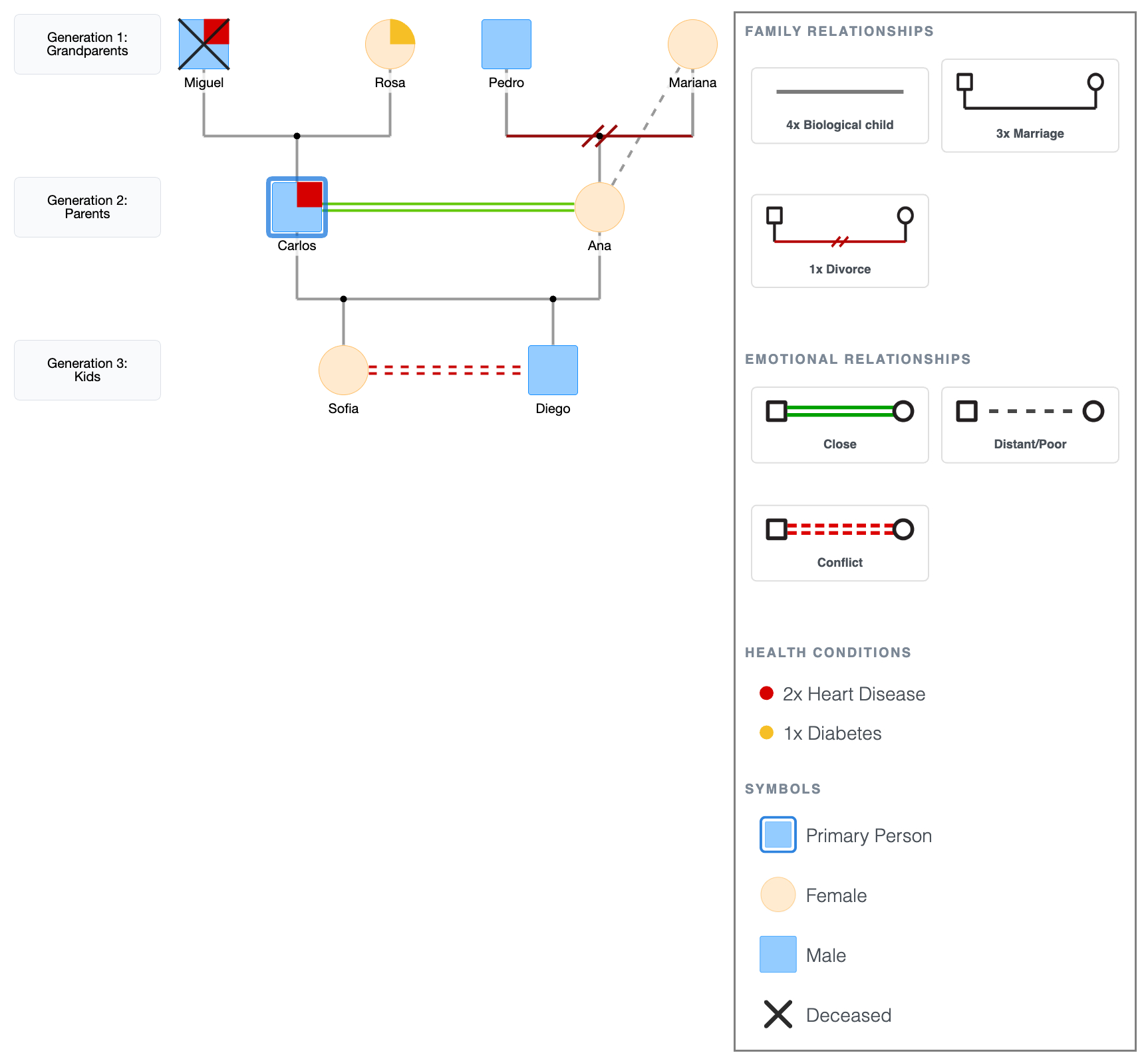
It’s with three generations that you really start to see things that happen repeatedly, and the point of the exercise isn't just to draw them, but to learn to understand how families work.
[See more 3-generation genogram examples →]
For a Family Therapy
In family therapy, therapists draw genograms to illustrate how feelings and relationships have flowed or not flowed through a family over time.
Multi-Divorce Blended Family Example: The Walsh Family
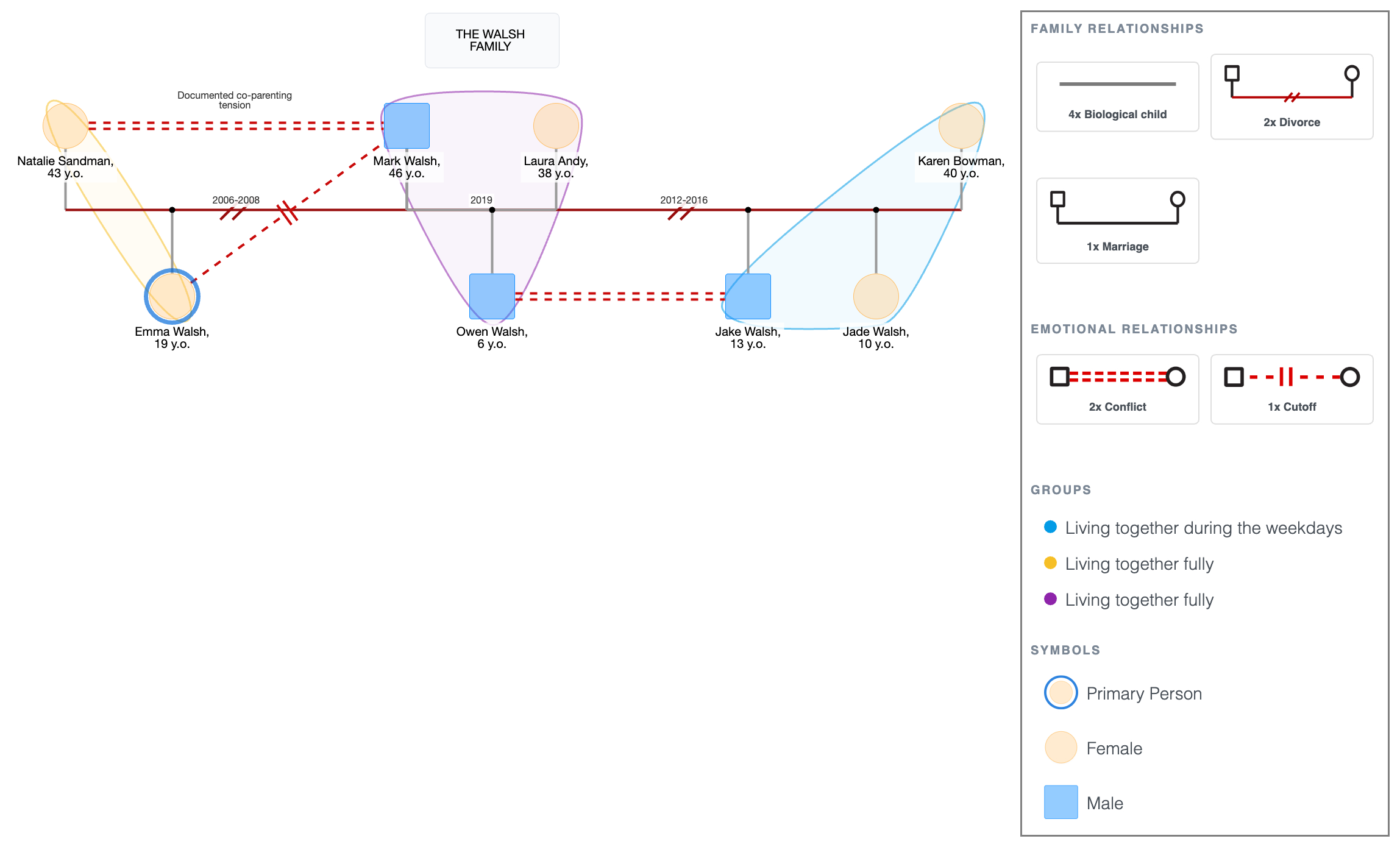
Once the emotional part of the diagram is on there, what looked like just something about the person’s personality is now looking like something they’ve got from their family; a pattern that is happening repeatedly with people in the family.
[See more blended family genogram examples →]
People also create genograms for social work assessments, medical and genetic counseling, blended family documentation, and conflict pattern mapping.
CTA BUTTON: [TRY EASYGENOGRAM FREE]
FAQ
What is the best free genogram creator?
EasyGenogram is free to get started with no cap on how many genograms you can build. Full access is from $9/mo/seat; students with a valid school email get full access including exports.
How do I make my own genogram?
Open EasyGenogram and either describe the family so AI can create the first tree automatically, or start manually with the drag-and-drop canvas. Then add family members, connect them using structural and emotional relationship lines, add household markers and health conditions where relevant, then export or share.
Is there an AI that can create a genogram?
Yes. EasyGenogram can create an editable genogram from a plain-language description. You can add more instructions to keep adjusting the tree, then use drag-and-drop editing for precise changes to symbols, people, relationships, and layout.
Can I use Canva to make a genogram?
Canva has no standard genogram symbols, emotional relationship notation, or health condition markers. It works for simple visual diagrams where clinical accuracy isn't required. For anything that needs to meet coursework or clinical standards, a purpose-built genogram creator like EasyGenogram is faster and more accurate.
Is there a free genogram template in Word?
Word has no genogram-specific symbols and no built-in genogram template. Basic templates are available online but are usually just shapes without proper notation. A browser-based genogram creator like EasyGenogram is faster and produces cleaner, standards-compliant output.