Appearance
Genogram Builder
A genogram builder helps you add people, relationships, and clinical detail without redrawing the whole diagram every time the family changes. EasyGenogram is a browser-based genogram builder with drag-and-drop editing, standard symbols, 50+ relationship types, and shareable links for clinical, educational, and collaborative use.
CTA BUTTON: [TRY EASYGENOGRAM FREE]
Before You Start
- Browse Genogram Templates if you want a ready-made structure to start from.
- Check Genogram Symbols for the correct relationship and emotional connection markers.
- Read How to Make a Genogram for the full step-by-step process.
What's Included in This Genogram Builder?
[CARD DISPLAY FOR SKIMMABILITY]
- Drag-and-drop canvas: add people, connect them, reposition without redrawing.
- 50+ relationship types: structural lines for marriage, divorce, cohabitation, separation, and adoption; emotional lines for closeness, conflict, distance, cutoff, and enmeshment.
- Custom Emotional Connections: define your own relationship line with a custom title, color, pattern, and direction for relationships that don't fit a preset.
- Purpose-built symbols: standard genogram shapes for individuals, relationships, households, pregnancies, and health events.
- Health condition markers: color-coded markers for diagnoses, behavioral history, and causes of death.
- Household lines: show who lives together within a shared boundary.
- Auto-generated legend: symbols and relationship types listed automatically as you build.
- Shareable links: share an editable genogram with a client, student, or colleague; they open it in their own browser, no account needed.
- Export options: download as PDF, PNG, JPG, or SVG.
- Free to get started: full builder access from $9/mo/seat; free for students with a school email.
CTA BUTTON: [TRY EASYGENOGRAM FREE]
How the EasyGenogram Builder Works
How to use EasyGenogram in five steps:
1. Open the canvas
Opens with a default family structure already in place. Edit it directly or clear it and start fresh. No download or account required.
2. Add family members
Drag shapes from the panel onto the canvas. Each shape represents one person. Tap any shape to add a name, age, health conditions, and notes.
3. Connect people
Click any person's shape; the quick-add buttons appear.
Use Add Partner, Add Children, Add Parents, or Add Siblings to build the structure, or click Connect to draw a relationship line between any two people.
A picker appears to choose from structural types (marriage, divorce, cohabitation, separation, adoption) or emotional types (closeness, conflict, distance, cutoff).
For relationships that don't fit a preset, use the Custom Connections tab to configure your own line pattern, number of lines, and colour.
4. Add household and health markers
Draw household lines around people who live together. Add color-coded health condition markers for diagnoses, behavioral history, and causes of death.
5. Share or export
Generate a shareable link for remote collaboration, or export as PDF, PNG, JPG, or SVG. Students with a valid school email export free.
For the full step-by-step process, see How to Make a Genogram Online.
CTA BUTTON: [TRY EASYGENOGRAM FREE]
See It in Action
Watch a genogram built from start to finish in under five minutes.
[YouTube embed — https://www.youtube.com/watch?v=jImpP6bY8Eg]
CTA BUTTON: [TRY EASYGENOGRAM FREE]
What You Can Build
EasyGenogram supports the full range of standard genogram types, including:
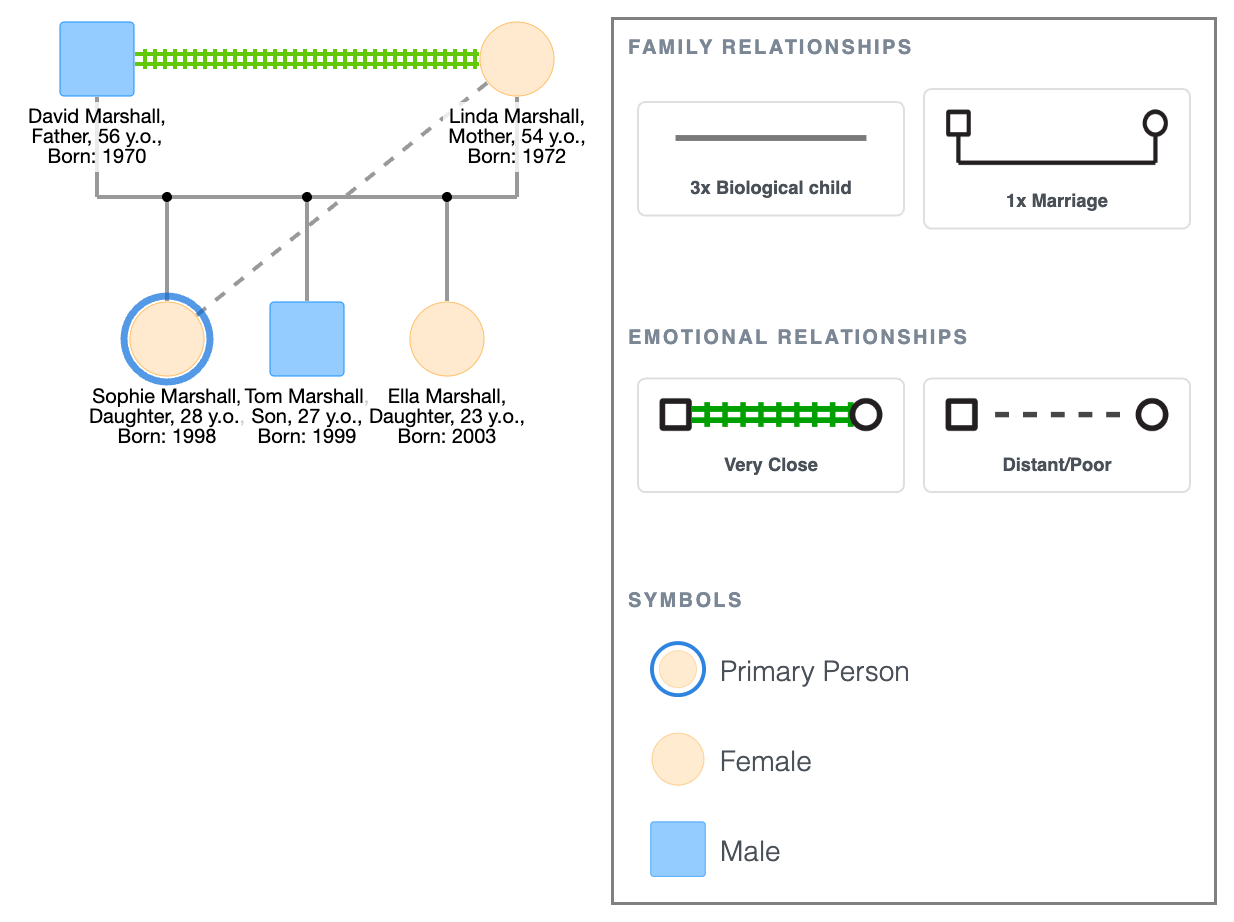
A simple genogram showing basic family structure, parent-child relationships, and living status; the kind of diagram you'd build in a first session or for an introductory assignment.
Simple Genogram Example
[See more genogram examples →]
CTA BUTTON: [TRY EASYGENOGRAM FREE]
Who the EasyGenogram Builder Is For
- Therapists and counselors: Build during a session using emotional relationship lines and conflict markers, then share the link with the client before the call ends. Useful for both in-person and telehealth contexts.
- Social workers: Document household structures, caregiving arrangements, foster placements, and behavioral history in a format that stays readable as the case develops. The Custom Emotional Connections feature covers clinical relationships that don't fit standard presets.
- Students: Browser-based with no installation required. Sign up with a student email and exports are free.
- Healthcare and genetic counseling: Track hereditary conditions and family medical history across generations. Health condition markers and color coding are available for every individual on the canvas.
CTA BUTTON: [TRY EASYGENOGRAM FREE]
FAQ
What is a genogram builder?
A genogram builder is a tool for constructing family diagrams that show relationships, health history, and emotional patterns across generations. Purpose-built genogram builders like EasyGenogram include standard clinical symbols and relationship line types out of the box.
What is the best free genogram builder?
EasyGenogram is free to get started with no cap on how many genograms you can build. Full builder access is available from $9/mo/seat; students with a valid school email get full access including exports.
How do I make my own genogram?
Open Easygenogram’s builder with standard symbols already included. Add family members, connect them using structural and emotional relationship lines, add household markers and health conditions where relevant, then export or share.
Does Microsoft have a genogram template?
Word and PowerPoint have basic shape libraries but no genogram-specific symbols. Lines don't follow shapes when you move them, which makes editing slow and results rarely meet clinical or coursework standards.
Does Google Docs have a genogram template?
No. Google Docs has no genogram-specific symbols. You can draw rough shapes using the Drawing tool, but lines don't follow shapes when repositioned and there's no clinical notation support.