Run the day-to-day work of your practice.
Manage clients, bookings, sessions, packages, and legal documents with online signatures.
Practice management software
Manage the day-to-day work of your practice with a library of 1,500 ready-to-use interactive tools for the work you do with clients.

01 / HOW QWOACH WORKS
As each client relationship develops, keep the work you do together connected—from sessions and shared resources to the tools you use.
Manage clients, bookings, sessions, packages, and legal documents with online signatures.
Sessions, journals, and shared resources stay with each client as the work continues.
Explore a comprehensive library of ready-to-use assessments, worksheets, visual maps, and more.
02 / PRACTICE MANAGEMENT
Set your availability, offer session types, and let clients book.
Keep each client's details and history in one record.
See upcoming and past sessions for each client.
Create and manage packages that span multiple sessions.
Manage group sessions, participants, and shared resources.
Collect client information and sign documents online.
03 / THE TOOL LIBRARY
Use resources together in a session or share them with clients.
Use questionnaires and assessments together or share them before a session.
Work through relationships and patterns with genograms, timelines, and visual maps.
Share exercises and worksheets clients can use between sessions.
Give clients journals and diaries they can return to as the work continues.
Use ready-made assessments as lead magnets and invite respondents to book a consultation.
Explore many more prebuilt resources, and configure any of them to fit your approach when needed.
04 / CLIENT PORTAL
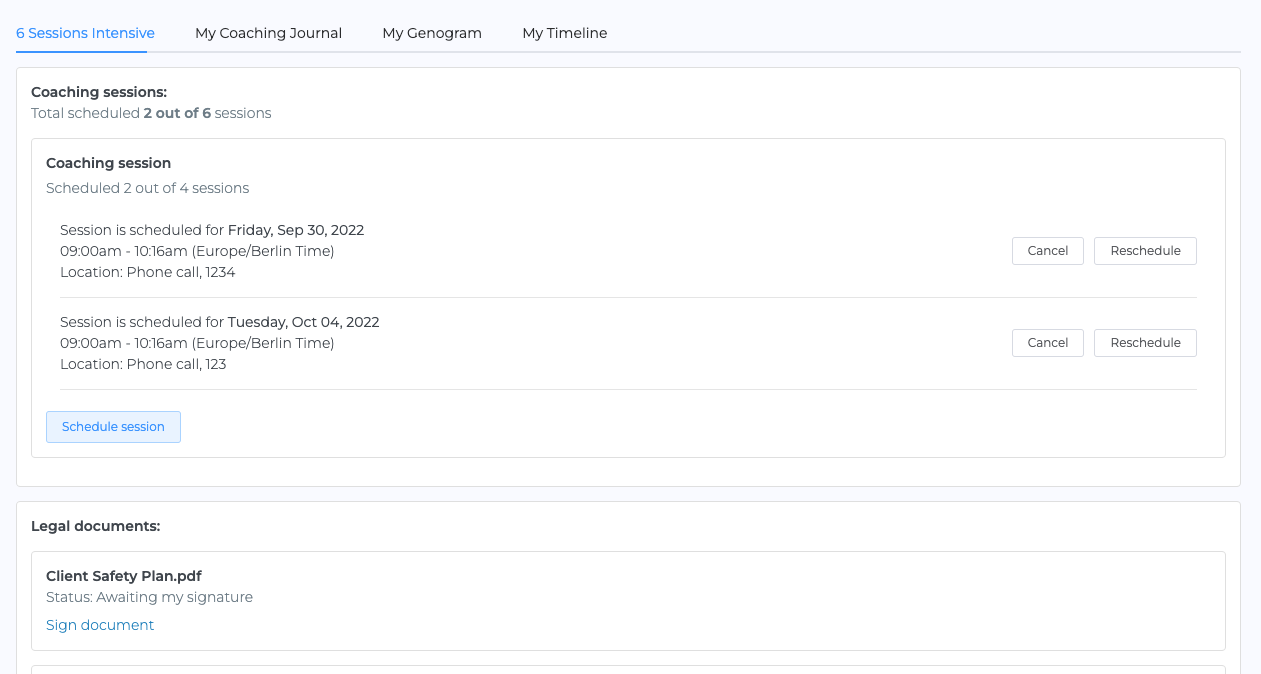
Clients can see their sessions, revisit their journal, and open the resources you share in a private portal. You can place the portal on your website with your own branding.
05 / FOR SMALL TEAMS
The owner sees the whole practice. Roles and permissions determine which clients, resources, and scheduling each teammate can access.
06 / SECURITY
Security runs through the whole system. Client information is protected when it’s stored and when it’s sent.
Client records and files are encrypted while stored.
Information is encrypted as it moves between Qwoach and your browser.
Only authorized people can open client files.
Qwoach runs on certified infrastructure that undergoes regular independent security audits.
07 / PRICING
All features included from day one. Test Qwoach with three clients. No time limit. No credit card. Then just $19/month.
Every Qwoach feature included.
08 / FREQUENTLY ASKED QUESTIONS
All Qwoach features are available for your own practice with your first three clients. There’s no credit card requirement or time limit. Teammates require paid seats.
When you’re ready to add a fourth, upgrade for $19/month and manage unlimited clients. The clients and work you’ve already set up stay in Qwoach.
Yes. Choose a prebuilt assessment, exercise, worksheet, journal, or visual map to use in a session or share with a client.
Yes. Every part of a resource is configurable. Start with a ready-made version, then change its questions, wording, and structure to fit your approach and the client you’re working with.
Yes. You can brand the portal and place it on your own website, so clients access it as part of your practice.
Each teammate and manager needs a paid seat. The manager can oversee the practice’s clients, payments, and access permissions.
Records and files are encrypted while stored and in transit. Access to client files is controlled through permissions.
YOUR PRACTICE, TOGETHER
Get client management, continuity across sessions, and instant access to 1,500 interactive tools.
Start free now 3 clients free.