Appearance
AI Genogram Maker: Create and Edit a Genogram from Text
EasyGenogram's AI genogram maker turns a plain-language family description into an editable genogram. You can add more instructions to adjust the tree, then use the regular drag-and-drop canvas for precise changes to people, relationships, symbols, and layout.
Before You Start
- Browse Genogram Templates if you want a ready-made structure to start from.
- Check Genogram Symbols for the correct relationship and emotional connection markers.
- Read How to Make a Genogram for the full step-by-step process.
How EasyGenogram's AI Genogram Maker Works
EasyGenogram combines AI drafting with manual control. That matters because most genograms are not finished after the first draft; they need correction, extra context, and notation checks.
1. Describe the family
Type the family structure, relationships, and important notes in plain language. EasyGenogram creates the first tree automatically instead of making you start from a blank canvas.
2. Refine it with more instructions
If the first draft needs changes, add another instruction. For example, you can ask EasyGenogram to add a child, adjust a relationship, include a second partner, or reorganize part of the family. The genogram keeps updating from your instructions.
3. Edit the genogram manually
When the structure is close, use manual drag-and-drop editing for precise manipulation. You can move people, edit labels, change relationship lines, add symbols, and clean up the layout directly.
Other AI Options
Other AI tools can help with rough genogram ideas, but they are usually less useful when you need an editable, notation-aware final diagram.
Creately AI
A general diagramming tool with an AI genogram feature built in. Works by converting text notes into a diagram layout and detecting patterns automatically.
Useful for teams collaborating on diagrams rather than clinical or academic genogram work specifically.
MyMap.AI
A visual mapping tool with a genogram generation feature. Works by converting a plain-language family description into a basic genogram layout.
Useful for quick rough-draft generation.
Edraw.AI
A general diagramming tool with AI-assisted generation and quick-start templates. Works by generating a diagram from a prompt using its built-in AI feature.
Useful for basic genogram creation without a steep learning curve.
ChatGPT
A general-purpose AI that can generate genogram-style diagrams when prompted correctly. Works by taking a detailed text description of the family structure and producing a static image.
Useful for rough visualization; works better on the Pro plan for more image generation capacity.
Gemini
Google's general-purpose AI with image generation capability. Works similarly to ChatGPT; describe the family and request a genogram-style visual.
Useful for quick rough sketches when a purpose-built tool isn't available.
Pros and Cons of AI Genogram Makers
AI genogram makers have advantages and disadvantages.
Pros
- Speed: They’re very fast, being able to create a diagram from a simple description in seconds. This is handy for initial ideas, a quick look at things, or getting a first draft down. It's quicker than creating one by hand if you don't need everything to be absolutely perfect at this stage.
Cons
- Accuracy: While they are fast, you have to check the AI's work. You'll often find mistakes in complicated family diagrams; relationships can be in the wrong place, the symbols are wrong, or the overall layout is off. And in a clinical setting, a mistake in a line showing a relationship will completely change the meaning of the genogram.
- Editability: Generic AI image tools often create a static picture. If it is wrong, you have to describe what you want again and generate a new image. EasyGenogram avoids that problem by creating an editable genogram you can refine with more instructions or adjust manually on the canvas.
- Client data and consent: Putting a client’s details into a 3rd party AI system does bring up questions about informed consent. Most ethical guidelines for professionals say clients should agree to what happens with their information. You should also look at the AI tool’s privacy policy and how long it keeps your data before you use it with a real client’s details.
- Cost: Although there are free versions of these tools, they don't give you much. Important security for clinical work like encryption, following HIPAA rules, and being able to store things safely offline are all parts of the paid-for options. Whether the expense is justified depends on your use case and how often you build genograms.
Why Use EasyGenogram for AI Genograms?
EasyGenogram gives you AI speed without locking you into the first output.
Use AI when you want a fast first draft from notes, a case summary, or a family description. Then iterate with follow-up instructions when the structure needs another pass.
When the details matter, switch to the manual canvas. Drag-and-drop editing is still available for precise manipulation, so you can correct the exact symbol, relationship line, label, or position instead of regenerating the whole diagram.
Regarding your information, EasyGenogram follows GDPR guidelines, encrypts your data, employs SAST and DAST security checks, and uses a safe way to create software, including periodic internal and external penetration testing. Your client's details remain within EasyGenogram.
How EasyGenogram Works
Start using EasyGenogram at no cost.
How to use EasyGenogram in three steps:
1. Generate a draft
Type your genogram description and let EasyGenogram create the first tree automatically. No download required.
2. Add more instructions
Tell EasyGenogram what to change next. Add missing people, adjust relationships, or clarify family structure without starting over.
3. Fine-tune manually
Use drag-and-drop editing for precise changes to people, symbols, relationship lines, and layout.
4. Share or export
Generate a shareable link for remote collaboration, or export as PDF, PNG, JPG, or SVG. Students with a valid school email export free.
See It in Action
Watch a genogram built from start to finish in under five minutes.
[YouTube embed — https://www.youtube.com/watch?v=jImpP6bY8Eg]
See What You Can Build
EasyGenogram supports the full range of standard genogram types, including:
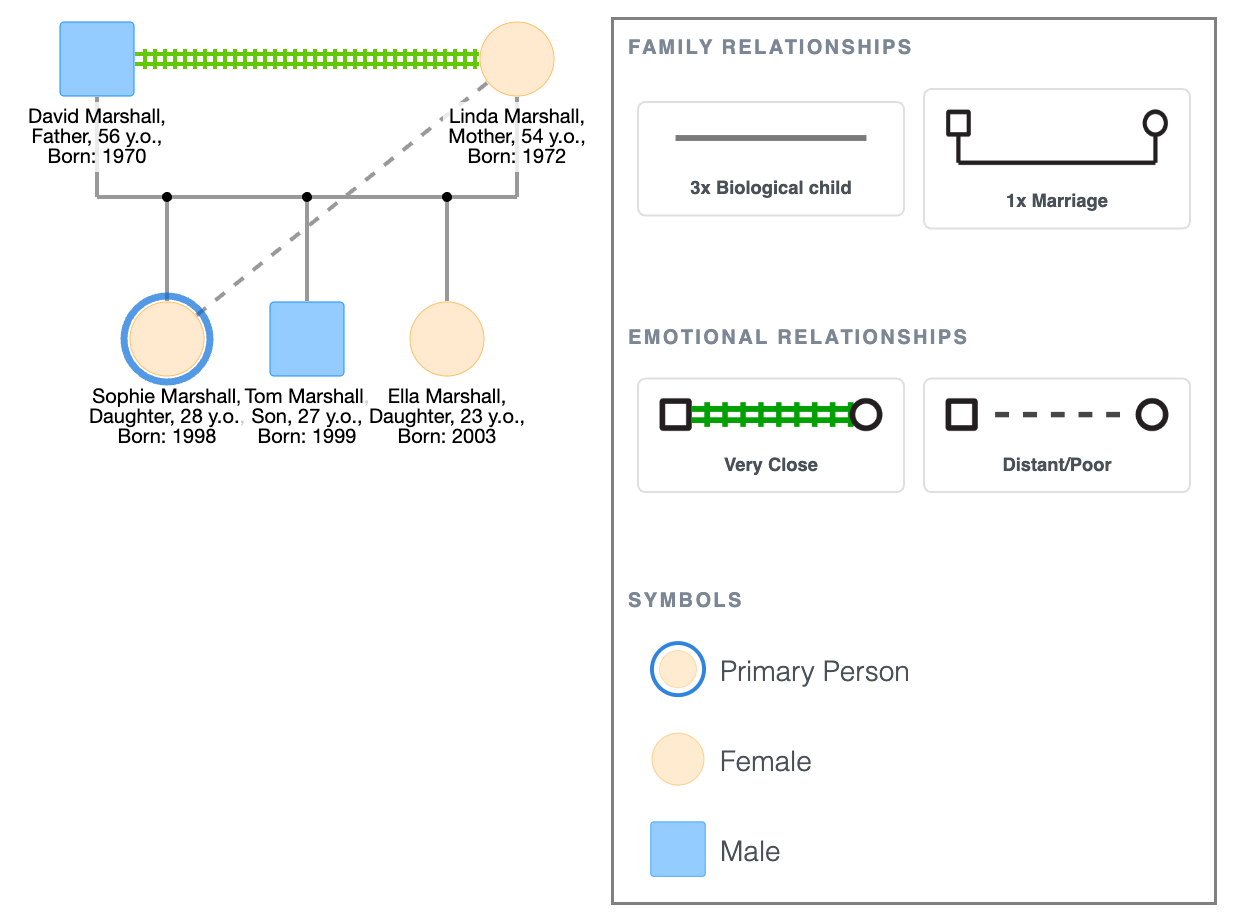
A simple genogram showing basic family structure, parent-child relationships, and living status; the kind of diagram you'd build in a first session or for an introductory assignment.
Simple Genogram Example
[See more genogram examples →]
FAQ
Is there an AI that can create a genogram?
Yes. EasyGenogram can create an editable genogram from a plain-language description. You can then add more instructions to refine the tree or use manual drag-and-drop editing for precise changes.
What is the best free AI genogram maker?
The best free AI genogram maker depends on whether you need a quick static image or an editable genogram. EasyGenogram is the better fit when you want AI drafting plus manual control over the final diagram.
Does Google Docs have a genogram template?
No. Google Docs has no genogram-specific symbols. You can draw rough shapes using the Drawing tool, but lines don't follow shapes when you move them and there's no clinical notation support.
Does Microsoft have a genogram template?
Word and PowerPoint have basic shape libraries but no genogram-specific symbols or emotional relationship notation. Editing is slow and results rarely meet clinical or coursework standards.
Can I use ChatGPT to make a genogram?
Yes. With a detailed prompt, ChatGPT can generate a genogram-style image from a family description. The output is useful for rough visualization, but for clinical or academic use you need to verify every relationship, symbol, and label against standard notation before using it in documentation.