Appearance
Genogram for Class
Your class genogram needs to show your family across three generations using standard symbols. This page has a complete sample you can open in EasyGenogram, replace with your own family details, and download as a PDF or PNG for submission.
What a Class Genogram Requires
Most class genograms ask for:
- Three generations: your grandparents, your parents, and yourself.
- Names and ages for everyone included.
- Standard symbols: squares for males, circles for females, a double border for yourself as the primary person, an X for anyone deceased.
- Structural lines: marriage lines, parent-child connections, siblings listed oldest to youngest from left to right.
- A key listing every symbol you used.
What gets added on top of this depends on your course.
Nursing and health courses add health conditions and causes of death.
Social work and counseling courses add relationship lines like close, distant, conflict, cutoff.
Psychology courses often require both.
If your brief doesn't specify anything beyond basic structure, the sample below covers what you need.
A Ready-to-Use Sample Genogram for Class: The Brent Family
Sample Genogram for Class
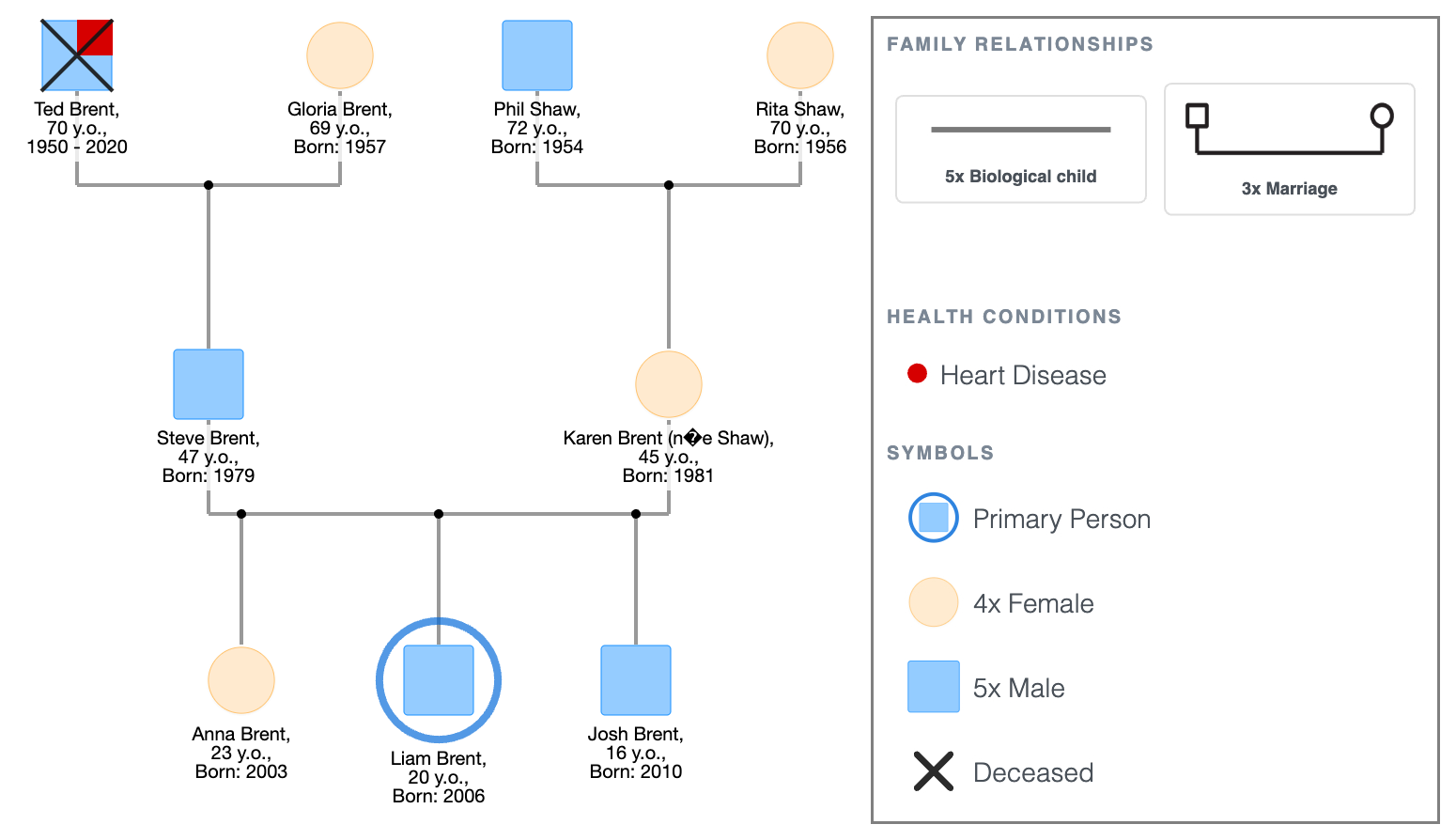
The family:
- Liam Brent, 20, primary person.
- Parents: Steve Brent, 47, and Karen Brent (née Shaw), 45. Married.
- Liam's siblings: Anna Brent, 23, and Josh Brent, 16.
- Paternal grandparents: Ted Brent (deceased, 2020, heart disease, age 70) and Gloria Brent, 69.
- Maternal grandparents: Phil Shaw, 72, and Rita Shaw, 70.
What this genogram shows:
- Three generations, everyone named and aged. Ted's X marks him as deceased with his cause of death and age noted beside his symbol.
- Anna, Liam, and Josh sit on the same sibship line in birth order; Anna on the left (oldest), Josh on the right (youngest).
- The key at the bottom of the diagram lists squares (males), circles (females), the double border (primary person), the X (deceased), and the line types for marriage, parent-child connections, and siblings.
- There are no health notes or relationship lines beyond structure. This is the baseline; what a class genogram looks like before course-specific layers are added.
Sample Genogram for Class
Explore this genogram and adapt it to your needs.
Adjusting It for Your Course
1. Nursing or health class
Add health conditions beside each person's symbol with the diagnosis year, and cause of death for anyone deceased. Ted's heart disease is already noted in the sample; extend that layer across the full diagram for all family members where relevant.
2. Social work or counseling class
Add relationship lines for significant connections. A close line, a distant line, a conflict line, or a cutoff where they exist in your family. The family genogram assignment page shows what this looks like with examples.
3. Psychology class
Most psychology briefs ask for both health notes and relationship lines. The genogram assignment page covers the full structure for psychology and counseling coursework.
If you're not sure what your brief requires, check whether it asks for health history, relationship quality, or both, then add only what it specifies.
How to Download It
- Open the Brent family genogram in EasyGenogram using the link above.
- Replace each person's details with your own family; name, age, and any required annotations.
- Click the PDF or PNG button in the top toolbar.
- Save the file and attach it to your submission.
How to Build Your Own From Scratch
If you'd rather start from a blank canvas than adapt the sample, see how to make a genogram for a full step-by-step walkthrough.
- Place yourself as the primary person: double border on your symbol.
- Add your parents and siblings: parents in the row above, siblings beside you oldest to youngest.
- Add your grandparents: both sets, connected to their children.
- Fill in names and ages: every person on the diagram needs at least a name and current age or birth year.
- Add a key: list every symbol type used.
- Add course-specific layers: health notes, relationship lines, or both depending on your brief.
- Export: PDF or PNG for submission.
FAQ
What should a genogram for class include?
At minimum, three generations of family members with names and ages, standard symbols (squares for males, circles for females, X for deceased, double border for yourself), structural lines (marriage, parent-child, sibling), and a key. What gets added beyond this depends on your course.
How do I make a genogram for class online for free?
Open the Brent family sample above in EasyGenogram; no account or download required to start. Replace the family details with your own, add any course-specific layers your brief requires, and export when done.
Can I download a genogram for class as a PDF?
Yes. Open the sample in EasyGenogram, fill in your family details, and click the PDF button in the top toolbar. The file downloads directly to your device.
How many generations does a class genogram need?
Three is the standard for most courses; your grandparents, your parents, and yourself. Some briefs ask for four generations, which adds your great-grandparents or your own children if you have them. Check your brief for the specific requirement.
What symbols do I need for a class genogram?
The core set includes a square for each male, a circle for each female, a double border around your own symbol, an X through the symbol of anyone deceased, a horizontal line for each married couple, vertical and horizontal lines for parent-child and sibling connections, and a key listing what each symbol means.
Sources
- Genograms: Assessment and Intervention (3rd ed.). W.W. Norton & Company.