Appearance
Large Family Genogram Template
A large family genogram template helps you map multiple sibling branches, cousin groups, and married-in relatives without collapsing the structure into something unreadable. Use it when a standard family template breaks down because the real family system is too wide and too connected for a simple three-household view.
Large Family Genogram Template
What This Template Shows
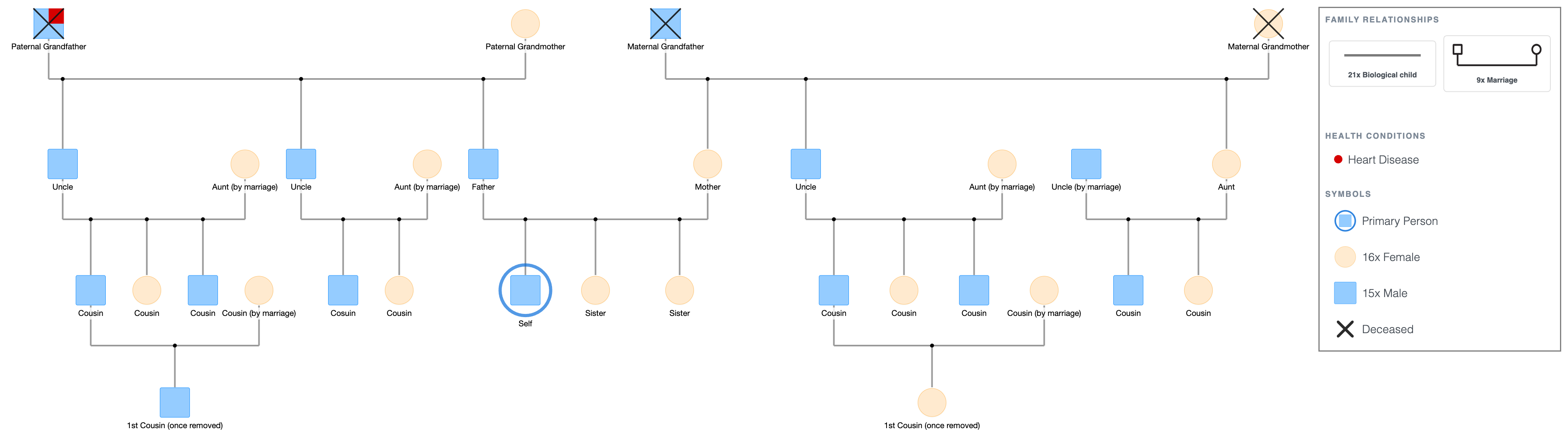
Four generations and thirty-two family members across both the paternal and maternal sides.
Each set of grandparents had three children; Father and his two brothers on the paternal side, Mother and her sister and brother on the maternal side.
Each sibling has their own family: a spouse (labeled by marriage where applicable) and two to three children.
The eldest cousin on each side is married with one child of their own, extending the diagram into a fourth generation.
Father and Mother's three children, including Son as the primary person, sit at the centre base of the diagram.
The symbol legend is displayed below the diagram. For a full reference, see Genogram Symbols Explained.
When to Use This Template
- Large family clinical documentation: when the family system has multiple siblings per generation, several sibling-family branches, and a large number of cousins, and a standard three-generation template isn't wide enough to hold it.
- Multigenerational family therapy: when the clinical work requires mapping alliances, triangulation, or relational patterns that run across a large extended network, not just a nuclear unit.
- Social work and child welfare cases: when the case involves a large family system with multiple potential caregivers, kinship placements, or support network members who need to be documented together.
- Genealogical and heritage mapping: when the purpose is to document a large family history across multiple sibling branches, particularly in families with three or more children per generation.
How to Use This Template
1. Download as-is
Click the PDF or PNG button under the embed to download the template immediately. Print and fill in by hand, or use it as a structural reference.
2. Customize before downloading
Click "Use this genogram" to open the template in EasyGenogram. Replace the generic labels with real names, add or remove sibling branches, adjust the number of cousins in any branch, and layer in emotional relationship lines or health condition markers as needed.
Export as PDF or PNG when done, or share via link with a supervisor, colleague, or client. Students with a valid school email can export free; other users export from $9/mo/seat.
If you need the diagram in Microsoft Word, Google Docs, or for a Canva design, export as PNG and insert it into your document.
Large Family Genogram Template
Explore this genogram and adapt it to your needs.
FAQ
Is this large family genogram template free?
Yes, open and customize it in EasyGenogram at no cost. Export requires a subscription for most users; students with a valid school email can export free.
What counts as a large family genogram?
A large family genogram usually covers a family system with three or more children per generation and multiple sibling branches, resulting in a wide diagram with many cousins and married-in relatives across two or more generations. This template has over thirty family members across three generations and six sibling branches.
How do I navigate a large genogram without it getting cluttered?
Build generation by generation and use the drag-to-reposition feature in EasyGenogram to space shapes evenly as you go. Add emotional lines and health markers only after the full structure is in place; layering notation on top of a complete structure is easier than trying to manage both at once.
Can I print this template at a larger size?
Yes. Export as PDF from EasyGenogram and print at any size; A3 or larger works well for a diagram this wide. PNG export also prints cleanly at high resolution.
How do I add more sibling branches to this template?
Open the template in EasyGenogram, click either parent's shape, and select Add Children to add another sibling. Then click the new sibling's shape and use Add Partner and Add Children to build out their family branch.