Appearance
Extended Family Genogram Template
An extended family genogram template helps you map relatives outside the immediate household, including grandparents, aunts, uncles, and cousins across both sides of the family. Use it when a nuclear-family diagram is too narrow to show who actually matters in the wider family system.
Extended Family Genogram Template
What This Template Shows
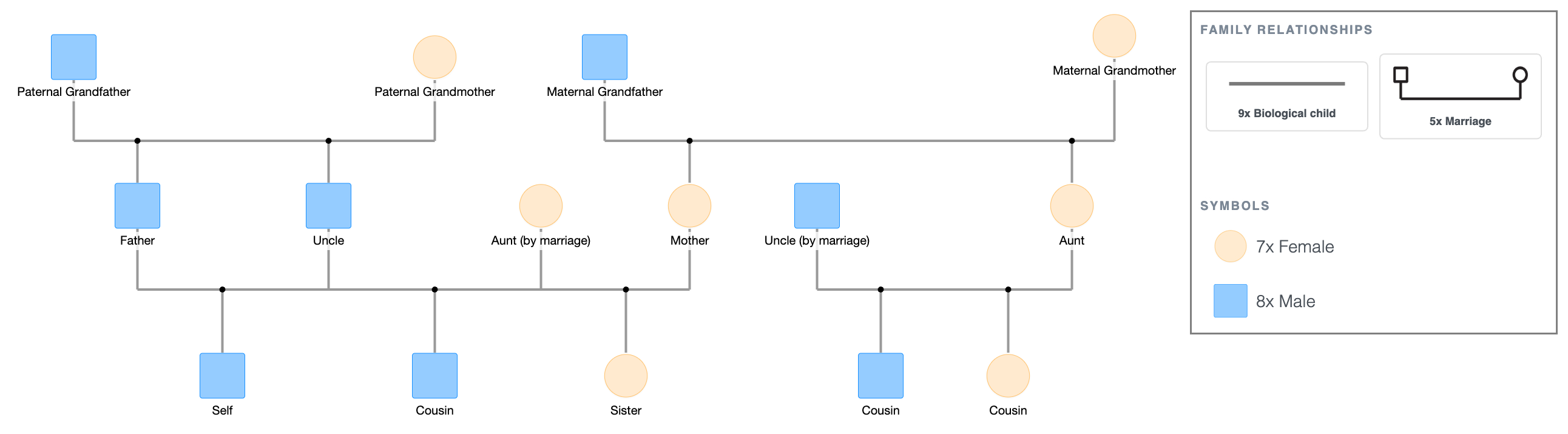
Three generations across both the paternal and maternal sides, with sibling branches at the second generation level on each side.
On the paternal side, the paternal grandparents have two children; Father and Uncle (blood). Uncle is married to Aunt (by marriage). They have one child: Cousin.
On the maternal side, the maternal grandparents have two children; Mother and Aunt (blood). Aunt is to married Uncle (by marriage). They have two children, Cousins.
Father and Mother are married. Their children are Son (primary person) and Daughter.
The by-marriage labels on Paternal Aunt and Maternal Uncle make the distinction between blood relatives and married-in relatives visible at a glance, which is the specific thing an extended family genogram needs to show clearly.
The symbol legend is displayed below the diagram. For a full reference, see Genogram Symbols Explained.
When to Use This Template
- Extended family intake: when the clinical picture requires documentation beyond the nuclear household; aunts, uncles, and cousins who are part of the family system even if they don't live in the same home.
- Family systems work: when a therapist or counselor needs to map the extended family network to identify triangulation, alliances, or cutoffs that originate outside the nuclear unit.
- Social work case documentation: when the case involves extended family members as potential caregivers, support figures, or sources of conflict.
- Academic assignments requiring extended family notation: when the coursework specifies an extended family structure rather than a three-generation nuclear family diagram.
How to Use This Template
1. Download as-is
Click the PDF or PNG button under the embed to download the template immediately. Print and fill in by hand, or use it as a structural reference.
2. Customize before downloading
Click "Use this genogram" to open the template in EasyGenogram. Replace the generic labels with real names, add emotional relationship lines between any two family members, add health condition markers where relevant, or expand either branch by adding more children or a further generation.
Export as PDF or PNG when done, or share via link with a supervisor, colleague, or client. Students with a valid school email can export free; other users export from $9/mo/seat.
If you need the diagram in Microsoft Word, Google Docs, or for a Canva design, export as PNG and insert it into your document.
Extended Family Genogram Template
Explore this genogram and adapt it to your needs.
FAQ
Is this extended family genogram template free?
Yes, open and customize it in EasyGenogram at no cost. Export requires a subscription for most users; students with a valid school email can export free.
What is an extended family genogram?
An extended family genogram maps the family system beyond the immediate household and shows grandparents, aunts, uncles, cousins and more members alongside the nuclear family. It uses the same standard structural notation as any genogram but covers a wider network of relationships, including the distinction between blood relatives and those related by marriage.
How do I show the difference between blood relatives and relatives by marriage?
Blood relatives connect to via biological child lines. Relatives by marriage connect only via a marriage line to their spouse. The labels "(blood)" and "(by marriage)" in this template make that distinction explicit.
Can I add emotional relationship lines to this template?
Yes. Open the template in EasyGenogram, click any person's shape, click Connect, then click the shape of the person you want to draw the line to. A relationship picker appears; select the line type that matches the actual relationship.
How do I expand this template to include more extended family?
Open the template in EasyGenogram and use the quick-add buttons on any shape; Add Children to add more cousins, Add Siblings to add another aunt or uncle branch, or Add Parents to extend a generation upward.