Appearance
EasyGenogram vs Diagramming Tools: You Need a Dedicated Tool
General diagramming tools are built to handle different diagram types like flowcharts, org charts, floor plans, and wireframes. Genograms are one thing you can attempt in most of them, not something any of them are built around, unlike EasyGenogram, which is specifically built for genograms.
Why General Diagramming Tools Aren't Genogram Tools
- No genogram-specific symbols by default: General shape libraries, not clinical or emotional notation.
- No relationship-line notation: Connectors carry no built-in meaning.
- Versatility comes at the cost of specialization: Breadth across many diagram types means no tool goes deep on genogram structure specifically.
- Collaboration and presentation features are the priority: Most are built for teams and stakeholders, not casework.
- Free tiers often cap shapes or boards: Can get expensive fast for a large, multi-generational family.
Software Reviews
EasyGenogram is built specifically for genograms; dedicated symbols, an Institution node for system involvement, AI generation from plain-language descriptions, follow-up instructions for refinement, and a custom connection builder for relationships that don't fit a preset. Best for therapists, social workers, and students who need a genogram as the actual deliverable.
Lucidchart is an enterprise diagramming platform with a generic kinship-diagram template rather than genogram-specific notation. Best for teams already standardized on Lucidchart for other diagrams. Full comparison: EasyGenogram vs Lucidchart.
Canva is a design tool with decorative family-tree templates and no clinical notation. Best for a casual, non-clinical family sketch. Full comparison: EasyGenogram vs Canva.
Miro is a collaborative whiteboard that markets a "Free Genogram Maker" landing page, but has no genogram feature inside the actual app. Best for teams already using Miro for broader workshop or brainstorming work. Full comparison: EasyGenogram vs Miro.
Microsoft Visio is enterprise diagramming software with no native genogram template or stencil. Best for organizations already on Microsoft 365 that need one tool for many diagram types. Full comparison: EasyGenogram vs Microsoft Visio.
Creately is a visual collaboration workspace with genogram templates alongside hundreds of other diagram types. Best for teams that already use it for broader visual work. Full comparison: EasyGenogram vs Creately.
EdrawMax is a general diagramming suite where genogram is one of many template types, not a first-class category. Best for users who need many other diagram types beyond genograms. Full comparison: EasyGenogram vs EdrawMax.
What a Genogram Tool Should Actually Do
- Purpose-built symbols: Gender and relationship symbols plus a free-text Gender Identity field, so you're never boxed into a fixed list of options.
- A real relationship-line library: roughly 50 preset types across emotional, family, and children's connections, so relationship quality is visible at a glance instead of manually labeled.
- A custom connection builder: define your own line type when a preset doesn't fit, so unusual or specific dynamics don't get flattened into a generic line.
- AI drafting with manual editing: create a first draft from a plain-language description, refine it with more instructions, then edit the genogram directly, so you're never starting from a blank canvas.
- One-click family structure: add a parent, partner, child, sibling, or connection directly from a selected person, so building out a family takes seconds instead of individual placement.
- An Institution node: a dedicated symbol for CPS, court, school, or agency involvement, so a case file shows outside-system involvement clearly.
- Structured clinical fields: Health Conditions and Sexual Communication as named fields, so details stay consistent across a caseload instead of scattered across notes.
Quick Comparison
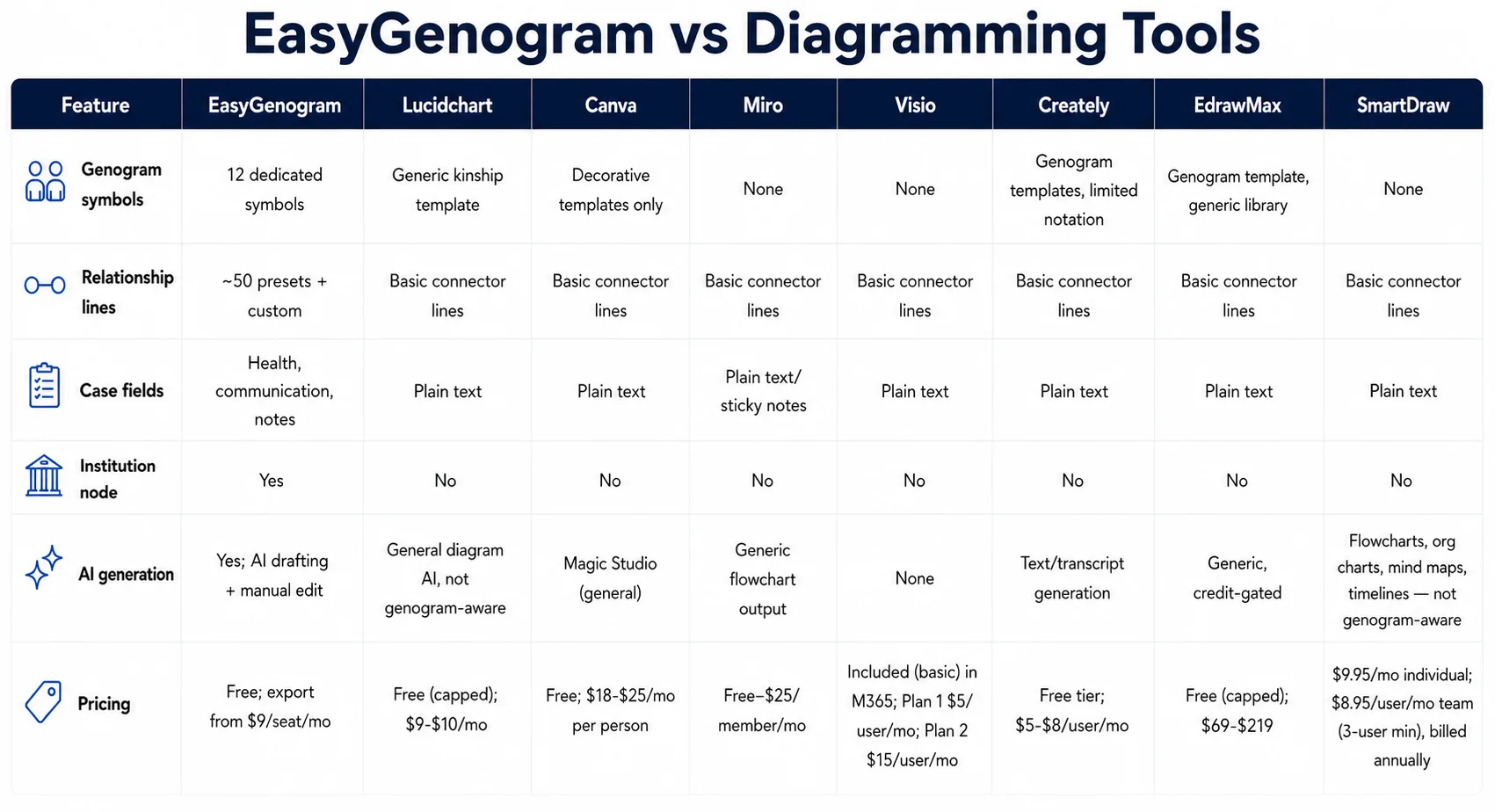
When Should You Use a General Diagramming Tool?
- You need many other diagram types beyond genograms, e.g., flowcharts, org charts, floor plans, etc., and want one tool for everything.
- Your team already collaborates inside one of these platforms for broader work.
- You're building a one-off genogram and don't mind assembling it from generic shapes.
When Should You Use EasyGenogram?
- Genograms are a regular part of your work, i.e., casework, therapy sessions, assessments, etc.
- You want the notation ready to use immediately, not built from scratch.
- The genogram is the deliverable itself, not one diagram type among many.
Which Should You Use: EasyGenogram or a General Diagramming Tool?
For genogram work specifically, EasyGenogram is faster and more accurate; the notation already exists. A general diagramming tool makes sense if genograms are a small, occasional part of much broader diagramming needs already centered on one of these platforms.
Build your genogram using EasyGenogram.
FAQ
What's the difference between a genogram tool and a diagramming tool?
A genogram tool comes with clinical symbols, relationship-line notation, and case fields built in. A diagramming tool covers many diagram types with generic shapes, requiring genogram notation to be built or approximated by hand.
Can I build a clinical genogram in a general diagramming tool?
Only by approximating it with generic shapes or a basic template. None of these tools include relationship-line notation or structured case fields for health conditions or institutional involvement like EasyGenogram, a genogram-specific tool, does.
Is EasyGenogram free to use?
Yes. Building and editing a genogram is free. Exporting requires a paid plan starting at $9/seat/month, with a 7-day free trial, but it's totally free for students.
Which diagramming tool has the best genogram template?
Creately and EdrawMax both include a genogram template among their broader diagram libraries, though neither goes as deep on clinical notation as a dedicated tool. Lucidchart and Canva offer generic or decorative templates instead. Miro, Visio, and SmartDraw have no genogram template at all. EasyGenogram, a genogram-specific tool, has hundreds of genogram templates readily available.
Which is better for therapists and social workers, EasyGenogram or a general diagramming tool?
EasyGenogram, since it's built for clinical and casework use specifically.