Appearance
EasyGenogram vs EdrawMax: A Genogram Tool vs. a Diagramming Suite
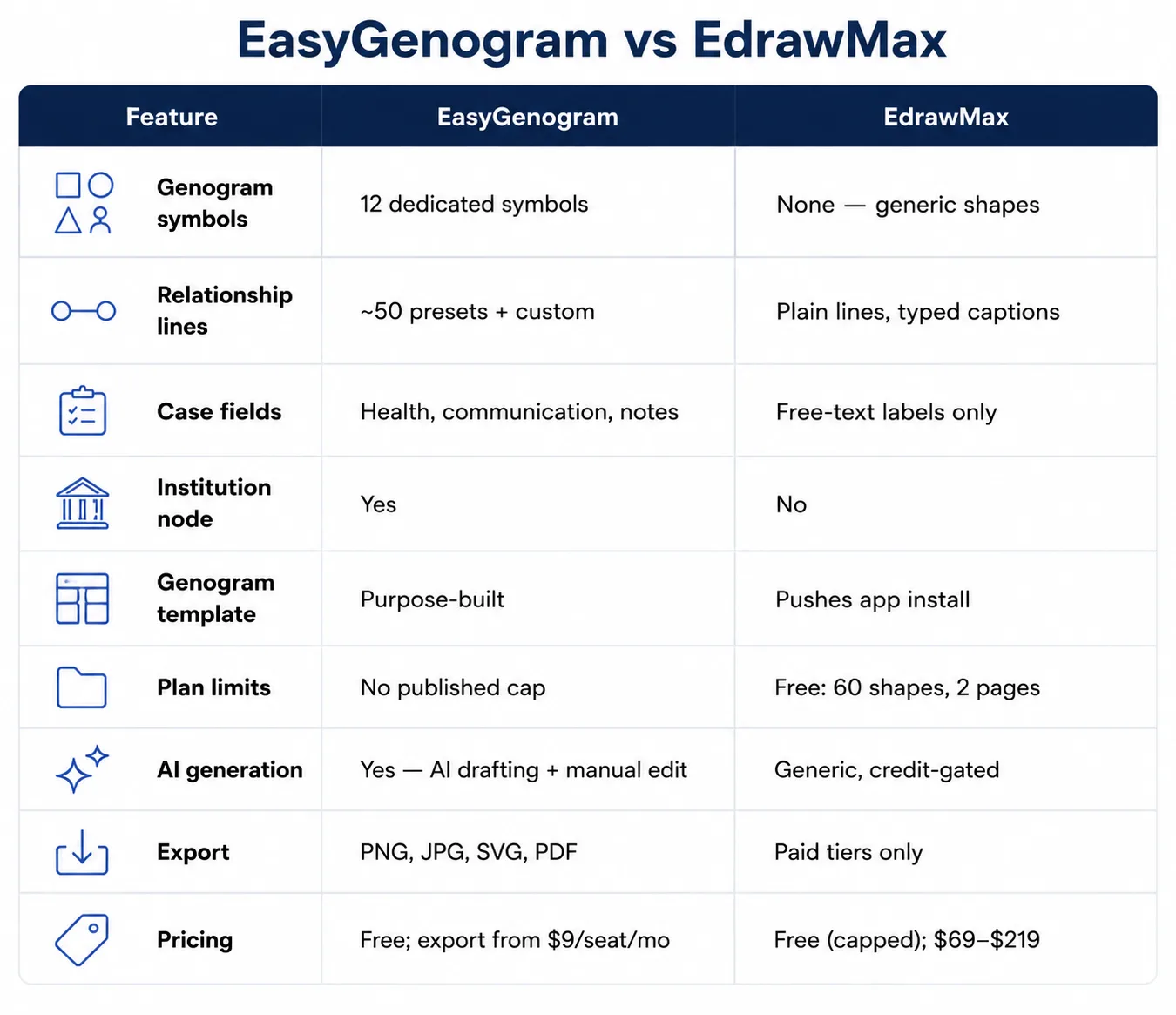
EdrawMax is a general diagramming suite with genogram templates buried among other diagram types. The platform has no dedicated genogram symbols, no relationship-line notation, and its genogram marketing page pushes you toward downloading a desktop app. EasyGenogram was built specifically for this.
The Problems With Building a Genogram in EdrawMax
- Genogram isn't a first-class template type
It's absent from EdrawMax's own onboarding category picker. Flowchart, Org Chart, Mind Map, Gantt Chart, Network Diagram, Floor Plan, and more are offered up front, but genogram isn't one of them. You have to search for it rather than being offered it as a starting path.
- No genogram symbols
Relationships are described with plain text labels under generic shapes, not a coded clinical symbol set.
- No relationship-line notation
Close, distant, fused, cutoff, hostile, abuse; none of these exist as line types. Every connection is a generic connector line with a text caption typed in by hand.
- Templates push you toward the desktop app
EdrawMax's genogram landing page markets downloadable templates that funnel you into installing the desktop application rather than building directly in a browser.
- Generic AI generation, not clinical notation
EdrawMax's AI assistant can generate a diagram styled like a genogram from a prompt, but it produces decorative cards and generic visual hierarchy, not McGoldrick-style symbols.
What a Genogram Tool Should Actually Do
Here’s what EasyGenogram, a genogram-specific tool, does:
- Purpose-built symbols: Gender/relationship symbols plus a free-text Gender Identity field, not boxed into a fixed list; useful when a person's identity doesn't fit the standard binary a generic tool assumes.
- A real relationship-line library: roughly 50 preset types across emotional, family, and children's connections, so relationship quality is visible at a glance instead of a generic connector line with a typed caption.
- A custom connection builder: define your own line type when a preset doesn't fit; useful when a family's situation doesn't match standard categories and the case file needs to reflect that accurately.
- AI drafting with manual editing: create a first draft from a plain-language description, refine it with more instructions, then edit the genogram directly; cuts down data-entry time so more of the session goes to the client, not the diagram.
- One-click family structure: add a parent, partner, child, sibling, or connection directly from a selected person, instead of building shapes manually inside a template meant for other diagram types.
- An Institution node: a dedicated symbol for CPS, court, school, or agency involvement, so a case file shows outside-system involvement instead of a generic shape with a typed label.
- Structured clinical fields: Health Conditions and Sexual Communication as named fields, so details stay consistent across a caseload instead of free-text labels scattered across the canvas.
Quick Comparison
When Should You Use EdrawMax?
- You already need a general diagramming suite for many other diagram types; flowcharts, org charts, network diagrams, floor plans, and a genogram is a rare, secondary need.
- You're fine working from a downloaded desktop app rather than building directly in a browser.
- A rough, non-clinical family sketch is enough, and the free tier's 60-shape cap won't be a problem for a small family.
When Should You Use EasyGenogram?
- Genograms are a regular part of your work; clinical practice, casework, or coursework.
- You need the diagram to hold up as an actual case document, not a rough sketch with typed labels.
- You don't want a shape cap or a desktop install standing between you and building the genogram.
Which Should You Use: EasyGenogram or EdrawMax?
For genograms that need to function as real clinical or casework documents, EasyGenogram is the safer choice; the notation exists, and pricing is scoped to exactly this task instead of a broader diagramming subscription.
EdrawMax only makes sense as an occasional, low-stakes addition inside a workflow already built around its diagram library.
Build your genogram using EasyGenogram.
FAQ
Does EdrawMax have genogram symbols?
No. Its genogram templates use generic shapes with text-label descriptors, not a coded clinical symbol set.
Can I make a clinical genogram in EdrawMax?
You can approximate one manually or by prompting its AI assistant, but there's no relationship-line notation, no clinical symbol set, and the free tier caps you at 60 shapes. EasyGenogram’s AI feature can generate an editable draft from text and still gives you manual genogram controls afterward.
Is EasyGenogram free to use?
Yes. Building and editing a genogram is free with no published cap on genogram size or number. Exporting requires the $9/seat/month Interactive Tools plan, with a 7-day free trial, but is entirely free for verified students.
Does EdrawMax's AI generate genograms?
It has a general AI diagram generator that can produce something styled like a genogram from a prompt, but it isn't genogram-aware and doesn't use clinical notation. EasyGenogram's AI workflow creates an editable genogram you can refine with instructions or adjust manually.
Which is better for therapists, EasyGenogram or EdrawMax?
EasyGenogram, for clinical or casework use specifically. EdrawMax fits better if you already use it for many other diagram types and only need genograms occasionally.