Appearance
EasyGenogram vs Creately: Focused Genogram Tool or Visual Workspace?
EasyGenogram is the better fit when the genogram itself is the deliverable, while Creately fits teams that need a broader visual workspace. Both can support genogram work, but EasyGenogram is built around genogram notation, custom relationship lines, and focused diagram creation.
Quick Comparison
Where EasyGenogram Is the Better Fit
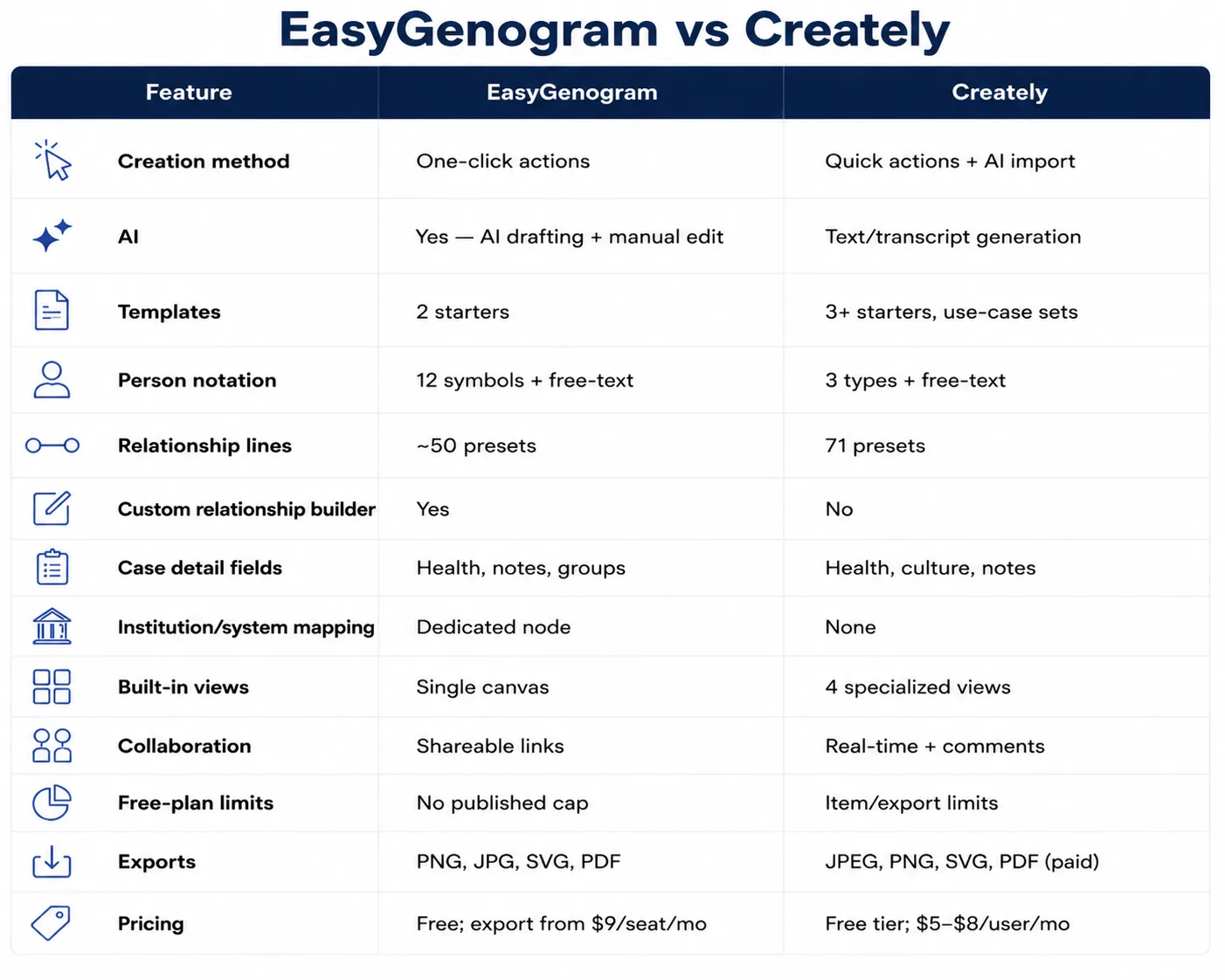
- Custom connections: create the exact relationship line your case needs instead of forcing it into a preset category; keeps documentation accurate when a family's dynamic doesn't fit a standard label.
- AI plus manual control: generate a first draft from a family description, refine it with follow-up instructions, then edit the genogram directly; get the structure down fast, then fix details by hand where precision matters.
- Institution nodes: map CPS, court, schools, hospitals, agencies, and other systems with a dedicated symbol, so outside-system involvement shows up in the case file instead of getting left out.
- More person-symbol options: built-in symbols for gay, lesbian, trans, bisexual, non-binary, pregnancy, unknown gender, and pets; useful when a family's makeup doesn't fit a binary or purely human structure.
- Focused workflow: build a genogram without navigating a wider project-management or visual-workspace system, so there's less setup between opening the tool and starting the diagram.
- No published size cap: build larger family structures without a stated people-per-genogram limit; useful for multigenerational or blended families that outgrow a capped free tier.
- Student access: verified students can build and export at no cost through classroom registration, removing cost as a barrier for coursework.
When Should You Use Creately?
- Your team needs broader visual-workspace collaboration; comments, real-time co-editing, multiple diagram types, not just a genogram.
- You want AI generation from a written transcript or notes, and don't need genogram-specific notation to be precise.
- The genogram is one part of a larger case file built inside a shared workspace your team already uses.
When Should You Use EasyGenogram?
- Genograms are a regular part of your work; therapy, social work, casework, or coursework.
- You need a custom relationship line, an Institution node, or clinical notation that a preset category can't cover.
- You want a focused tool that gets straight to building the genogram, without navigating a wider workspace platform.
Which Should You Use: EasyGenogram or Creately?
For clinical or casework use, EasyGenogram is the more focused and accurate choice; the notation already exists, so nothing has to be reconstructed from a general-purpose template.
Creately fits only when the genogram is a smaller part of broader team collaboration that already lives inside its workspace.
Build your genogram with EasyGenogram.
FAQ
What is the difference between EasyGenogram and Creately?
EasyGenogram is a focused genogram tool with AI drafting, follow-up instructions, manual editing, custom relationship connections, and institution nodes. Creately is a visual workspace that combines genogram templates, AI generation, data fields, and team collaboration.
Does Creately create genograms with AI?
Yes. Creately can generate a genogram from written notes or a family description, then lets you edit the result in its workspace.
Does EasyGenogram create genograms with AI?
Yes. EasyGenogram can create an editable genogram from a plain-language description, refine it with more instructions, and still let you edit the result manually.
Can I create a custom relationship line in EasyGenogram?
Yes. EasyGenogram lets you create a custom connection with your own name, line count, pattern, color, middle symbol, decoration, and direction.
Does Creately have an institution symbol for CPS or court involvement?
No dedicated institution node was available in the Creately genogram interface. EasyGenogram includes a hexagon institution symbol for CPS, court, school, agency, and similar system connections.
Is EasyGenogram free for students?
Yes. Students registered through a classroom account can build and export genograms without a subscription.