Appearance
EasyGenogram vs Miro: Which One Fits Your Workflow?
EasyGenogram is better than Miro for clinical or casework genograms because it has purpose-built notation, relationship lines, and family-structure shortcuts. Miro is useful for workshops and rough collaborative sketches, but this guide explains why a generic whiteboard does not replace a dedicated genogram tool.
The Problems With Building a Genogram in Miro
- Markets a "genogram maker" but has no genogram feature
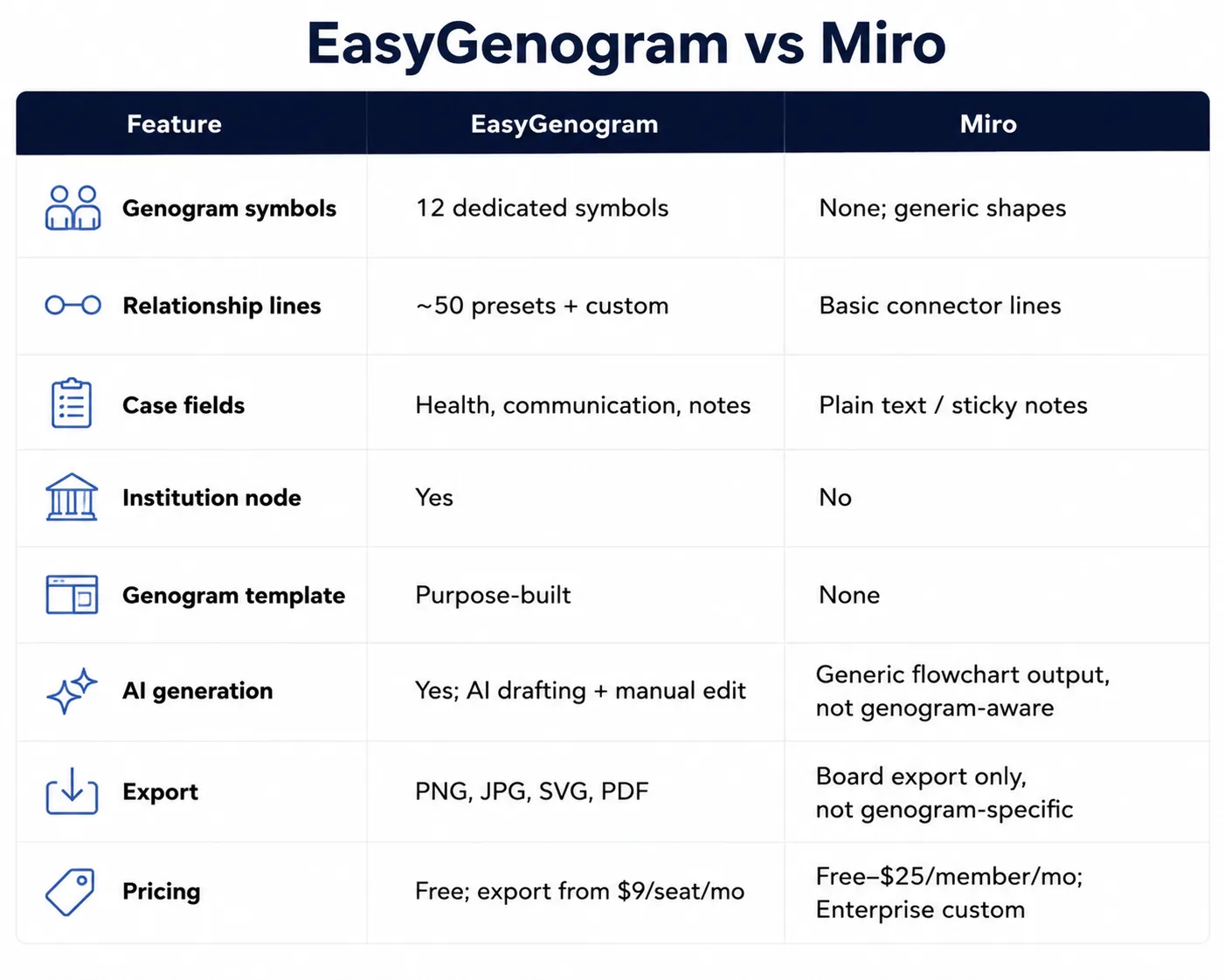
Miro runs a Free Genogram Maker landing page for search traffic, but there's no dedicated genogram tool inside the actual app; you land in the same generic whiteboard as any other Miro project.
- No genogram symbols
Generic shapes and sticky notes stand in for notation, placed and labeled by hand.
- No relationship-line notation
Close, distant, fused, cutoff, hostile, abuse; none of these exist as line types. Miro's connectors carry no built-in meaning.
- Miro's AI produces a generic flowchart, not a genogram
Asked directly to build one, it outputs plain ovals and rectangles connected by unlabeled lines; no gender symbols, relationship types, nothing resembling actual genogram notation.
- No structured case fields
Health conditions, case notes, and institutional involvement all end up as scattered text with no consistent format from one genogram to the next.
- Slow by design for this use case
Every shape, line, and label is placed manually, with no genogram-specific shortcuts.
What a Genogram Tool Should Actually Do
Here’s what EasyGenogram, a genogram-specific tool, does:
- Purpose-built symbols: Gender and relationship symbols plus a free-text Gender Identity field, so you're never boxed into a fixed list of options.
- A real relationship-line library: roughly 50 preset types across emotional, family, and children's connections, so relationship quality is visible at a glance instead of manually labeled.
- A custom connection builder: define your own line type when a preset doesn't fit, so unusual or specific dynamics don't get flattened into a generic line.
- AI drafting with manual editing: create a first draft from a plain-language description, refine it with more instructions, then edit the genogram directly, so you're never starting from a blank canvas.
- One-click family structure: add a parent, partner, child, sibling, or connection directly from a selected person, so building out a family takes seconds instead of individual placement.
- An Institution node: a dedicated symbol for CPS, court, school, or agency involvement, so a case file shows outside-system involvement clearly.
- Structured clinical fields: Health Conditions and Sexual Communication as named fields, so details stay consistent across a caseload instead of scattered across notes.
Quick Comparison
When Should You Use Miro?
- The genogram is a rough, one-off sketch dropped into a workshop or brainstorming board you already have open.
- You just need a rough placeholder rather than clinical accuracy.
When Should You Use EasyGenogram?
- Genograms are a regular part of your work; intake sessions, case documentation, family assessments.
- You need the notation to be accurate and consistent, not approximated with sticky notes.
- The genogram is the deliverable itself, not one piece of a board.
Which Should You Use: EasyGenogram or Miro?
For anything that needs to work as a real clinical or casework document, EasyGenogram is the clear choice; the notation already exists, and the AI draft starts from real genogram structure instead of a generic flowchart.
Miro only makes sense for a rough, disposable sketch inside a board you're already using for something else.
Build your genogram using EasyGenogram.
FAQ
Does Miro have a genogram template?
No dedicated one. Miro runs a "Free Genogram Maker" landing page for search traffic, but there's no genogram-specific tool inside the actual app; you land in the same generic whiteboard as any other Miro project.
Can I build a clinical genogram in Miro?
Not accurately. You can approximate one with generic shapes and sticky notes, but there's no relationship-line notation, clinical symbol set, and nothing purpose-built for family mapping.
Is EasyGenogram free to use?
Yes. Building and editing a genogram is free. Exporting requires a paid plan starting at $9/seat/month, with a 7-day free trial, but it's totally free for students.
Does Miro AI generate genograms?
Yes, but Miro's AI outputs a generic flowchart; ovals and rectangles connected by plain lines, with no gender symbols or relationship-line notation. It's editable afterward, but it isn't built for genogram structure to begin with. EasyGenogram's AI generates an actual genogram from a plain-language description, using real notation from the start.
Which is better for therapists and social workers, EasyGenogram or Miro?
EasyGenogram, since it's built for clinical and casework use specifically.