Appearance
EasyGenogram vs Family Tree Software: Which Do You Actually Need?
EasyGenogram is better than family tree software when you need clinical genogram notation rather than genealogy records. Family tree tools are built for lineage, archives, DNA connections, and GEDCOM data; this guide shows when that matters and when a purpose-built genogram tool is the right choice.
Why Family Tree Software Isn't the Same as a Genogram Tool
- Built for historical lineage, not clinical assessment: Birth and death records, immigration data, source citations; not relationship dynamics.
- No relationship-line notation across the category: Parent, child, and marriage lines only, no way to mark conflict, cutoff, closeness, or any other relationship type.
- No case fields: Media and document management exist for photos and records, not health conditions or institutional involvement.
- GEDCOM and archival syncing are the priority: Deep integration with Ancestry and FamilySearch databases, not casework.
- Mostly desktop-first, install-heavy: Most require a download and setup, unlike a browser tool you can open mid-session.
Software Reviews
EasyGenogram is built specifically for genograms; dedicated symbols, an Institution node for system involvement, AI generation from plain-language descriptions, follow-up instructions for refinement, and a custom connection builder for relationships that don't fit a preset. Best for therapists, social workers, and students who need a genogram as the actual deliverable.
FamilyEcho is a free, web-based family tree builder with GEDCOM import/export and no clinical notation. Best for mapping lineage and family structure without needing an install. Full comparison: EasyGenogram vs FamilyEcho.
Gramps is free, open-source genealogy software that works offline with deep customization for privacy-minded users. Best for genealogists who want full control over their data with no subscription or account required.
RootsMagic is one-time-purchase desktop genealogy software for Windows and Mac, with source tracking and syncing to Ancestry and FamilySearch. Best for researchers who want a permanent license instead of a subscription.
Ancestry.com is a subscription genealogy platform with the largest historical record database and DNA testing. Best for tracing lineage through historical records and DNA matches.
Family Tree Maker is a desktop app for Mac and Windows that syncs with Ancestry and FamilySearch trees. Best for genealogists already invested in the Ancestry ecosystem who want a dedicated desktop tool.
What a Genogram Tool Should Actually Do
Here’s what EasyGenogram, a genogram-specific tool, does:
- Purpose-built symbols: Gender and relationship symbols plus a free-text Gender Identity field, so you're never boxed into a fixed list of options.
- A real relationship-line library: roughly 50 preset types across emotional, family, and children's connections, so relationship quality is visible at a glance instead of manually labeled.
- A custom connection builder: define your own line type when a preset doesn't fit, so unusual or specific dynamics don't get flattened into a generic line.
- AI drafting with manual editing: create a first draft from a plain-language description, refine it with more instructions, then edit the genogram directly, so you're never starting from a blank canvas.
- One-click family structure: add a parent, partner, child, sibling, or connection directly from a selected person, so building out a family takes seconds instead of individual placement.
- An Institution node: a dedicated symbol for CPS, court, school, or agency involvement, so a case file shows outside-system involvement clearly.
- Structured clinical fields: Health Conditions and Sexual Communication as named fields, so details stay consistent across a caseload instead of scattered across notes.
Quick Comparison
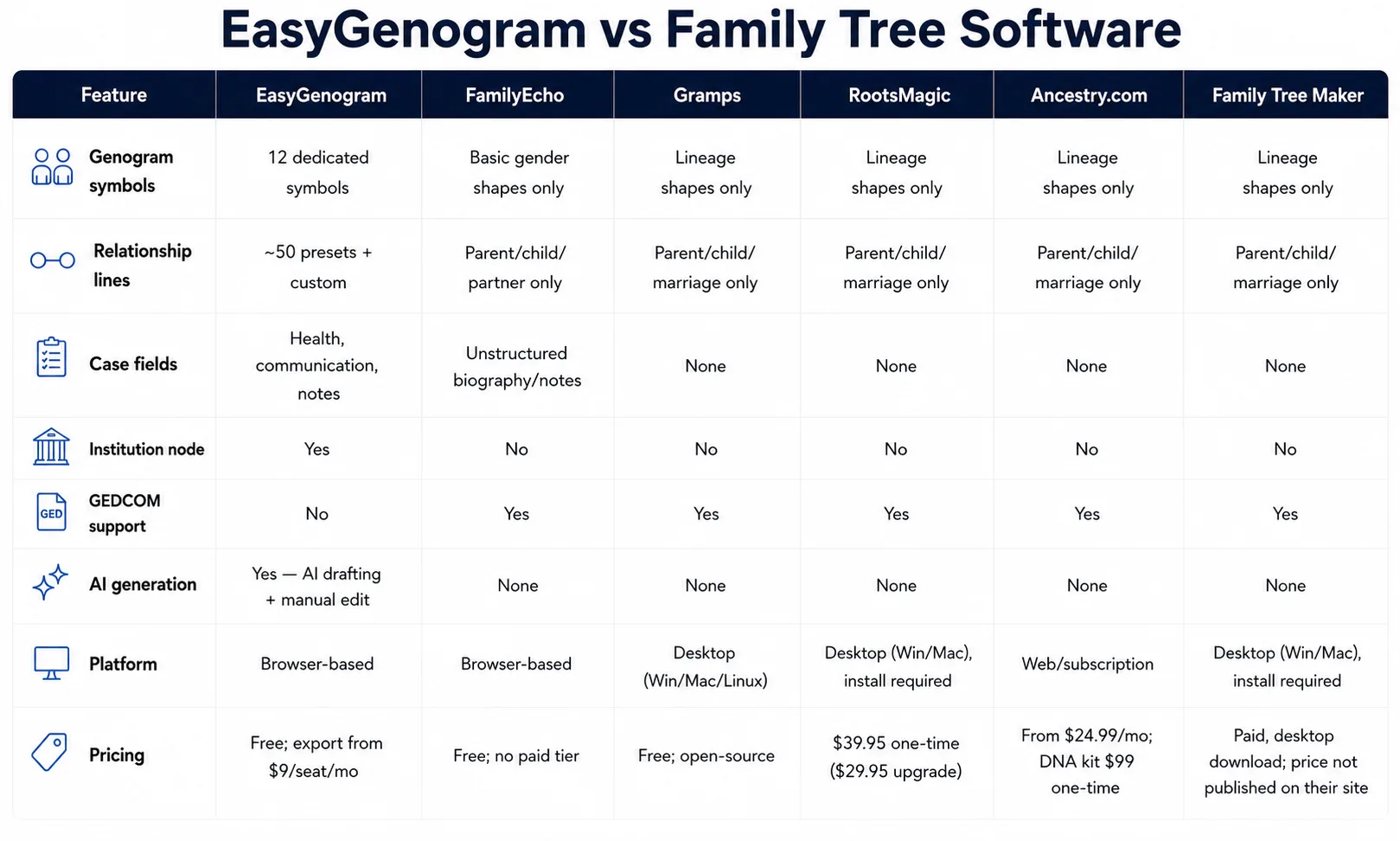
When Should You Use Family Tree Software?
- Your goal is genealogy research, i.e., tracing lineage, historical records, DNA connections across generations.
- You want GEDCOM support and syncing with archives like Ancestry or FamilySearch.
- You're building a large, multi-generational family archive, not a clinical case record.
When Should You Use EasyGenogram?
- You need to show relationship quality and clinical detail in casework, therapy, assessments, etc.
- CPS, court, school, or agency involvement needs to appear as part of the record.
- The genogram itself is the deliverable, not a genealogy archive.
Which Should You Use: EasyGenogram or Family Tree Software?
Family tree software is the choice for genealogy and historical research; none of it is built for casework, and it shouldn't be forced into that role. For clinical or casework use, EasyGenogram is built for exactly that.
Build your genogram using EasyGenogram.
FAQ
What's the difference between a genogram and a family tree?
A family tree maps lineage, who's related to whom across generations. A genogram adds relationship notation, emotional dynamics, and clinical fields like health conditions on top of that structure.
Can I use RootsMagic or Family Tree Maker to build a clinical genogram?
Not accurately. Both are built for genealogy research, with no relationship-line notation, clinical symbol set, or case fields for health conditions or institutional involvement.
Is EasyGenogram free to use?
Yes. Building and editing a genogram is free. Exporting requires a paid plan starting at $9/seat/month, with a 7-day free trial, but it's totally free for students.
Does family tree software support GEDCOM?
Yes, generally. It's a core feature for genealogy tools since it lets trees move between platforms and sync with archives like Ancestry and FamilySearch.
Which is better for therapists and social workers, EasyGenogram or family tree software?
EasyGenogram, since it's built for clinical and casework use specifically.