Appearance
Basic Genogram Template
A basic genogram template gives you the minimum family structure needed to start a diagram without pre-filling emotional lines, health markers, or extra generations. Use it when you need a clean structural base you can expand in EasyGenogram.
Basic Genogram Template
What This Template Shows
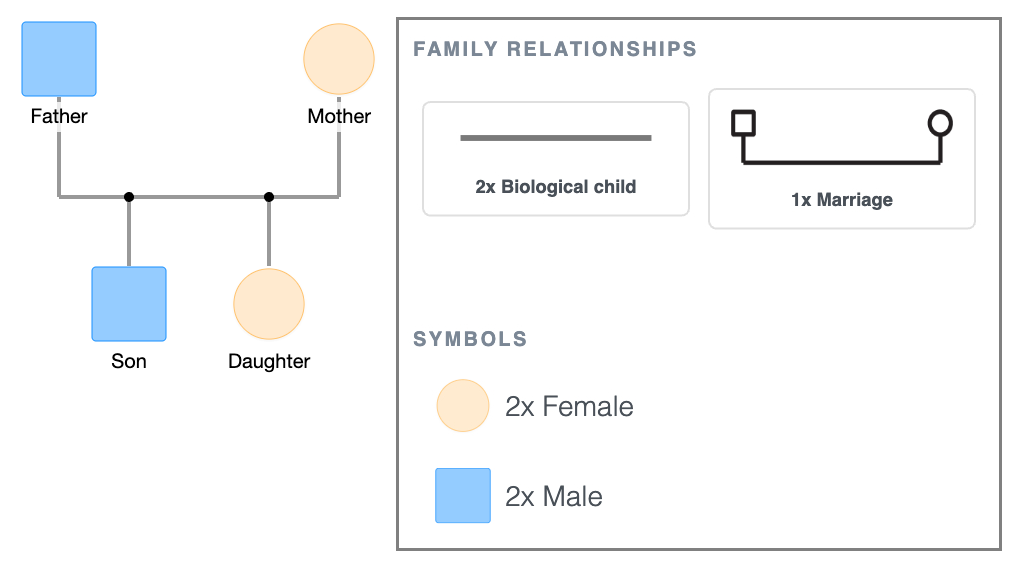
A married couple and their two biological children. A marriage line connects the parents; biological child lines connect each child to the couple.
This is the minimum viable genogram; the structural skeleton every other template builds on. Use it when you need to show who is related to whom and how, and nothing else. If you need emotional lines, health markers, or three generations, open the template in EasyGenogram and add what's needed, or start from the 3-Generation Genogram Template instead.
The symbol legend is displayed below the diagram. For a full reference, see Genogram Symbols Explained.
When to Use This Template
- First genogram assignment: when the brief requires a basic family structure and the student doesn't yet need emotional lines, health markers, or multi-generational depth.
- Quick intake documentation: when the goal is to establish the household structure in the first few minutes of a session before going deeper.
- Teaching genogram notation: when an instructor needs a clean, uncluttered diagram to introduce symbols and structural rules without the distraction of emotional overlays.
- Starting point for more complex diagrams: when you know the diagram will grow (you will need to add parents, siblings, emotional lines, health markers, etc.) and want to begin from the simplest possible base.
How to Use This Template
1. Download as-is
Click the PDF or PNG button under the embed to download the template immediately. Print and fill in by hand, or use it as a structural reference.
2. Customize before downloading
Click "Use this genogram" to open the template in EasyGenogram. Replace the generic labels with real names, add emotional relationship lines, health condition markers, or additional family members as needed.
Export as PDF or PNG when done, or share via link with a supervisor, colleague, or client. Students with a valid school email can export free; other users export from $9/mo/seat.
If you need the diagram in Microsoft Word, Google Docs, or for a Canva design, export as PNG and insert it into your document.
Basic Genogram Template
Explore this genogram and adapt it to your needs.
FAQ
Is this basic genogram template free?
Yes, open and customize it in EasyGenogram at no cost. Export requires a subscription for most users; students with a valid school email can export free.
What is a basic genogram?
A basic genogram maps the minimum required information, i.e., who is in a family, how they are related, and how they are connected structurally. This template shows a married couple and their two biological children with no additional layers. Everything beyond that (emotional lines, health markers, generational depth and more) gets added on top of this base.
What is the difference between a basic genogram template and a simple genogram template?
Both cover a nuclear family unit, but a simple genogram template includes emotional relationship lines already drawn in, while a basic genogram template has structural lines only.
How do I add more family members to this template?
Open the template in EasyGenogram, click any shape, and use the quick-add buttons (Add Partner, Add Children, Add Parents, Add Siblings, Add Connection) to expand the diagram. The structure adjusts automatically.
Can I use this basic genogram template for a class assignment?
Yes. This template meets the minimum structural requirements for most introductory genogram assignments. If your assignment requires emotional lines, health markers, or three generations, open the template in EasyGenogram and add what's needed, or start from the [3-Generation Genogram Template](/3-generation-genogram-template/) instead.