Appearance
Genogram Template for Word
A genogram template for Word helps you create the diagram in EasyGenogram and insert it into a Microsoft Word document as an image. Use it when your paper, case report, or assignment needs proper genogram notation but the final deliverable must live in Word.
Genogram Template for Word
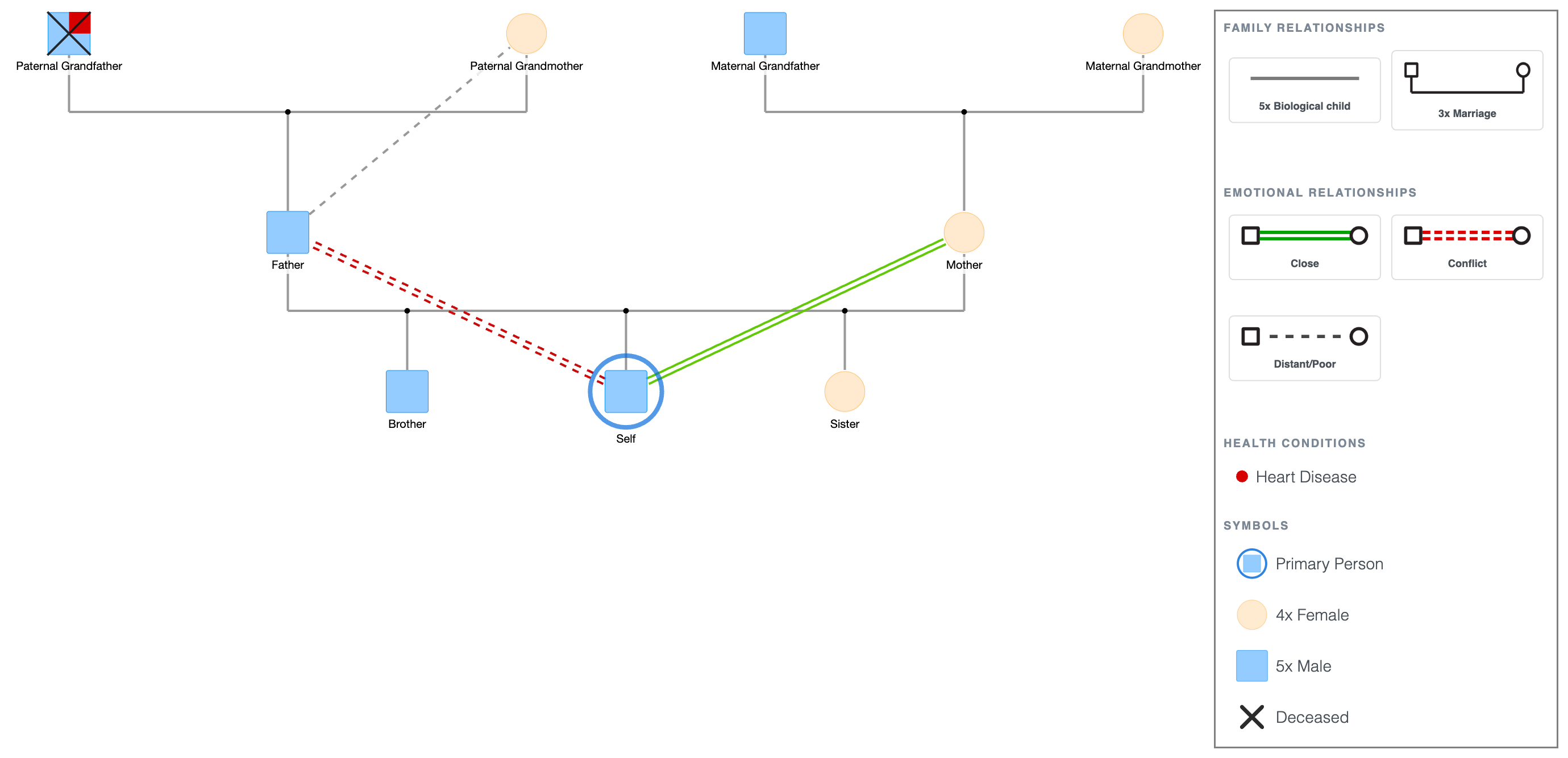
What This Template Shows
Three generations (grandparents, parents, and children) with structural lines covering marriage, divorce, and biological child relationships, and emotional lines showing closeness, conflict, and distance. Health condition markers sit on one member on the paternal side.
This is the standard layout for family therapy intake, social work assessment, and academic coursework.
The symbol legend is displayed below the diagram. For full definitions and clinical usage, see Genogram Symbols Explained.
When to Use This Template
- Coursework submitted as a Word document: export as PNG and insert directly into your assignment file.
- Case notes in a Word-based system: keep genograms alongside written case documentation in the same file.
- Reports and assessments drafted in Word: embed the genogram at the relevant section of a clinical or academic report.
- Supervision documentation: include a completed genogram in a Word-format supervision record or training portfolio.
How to Use This Template
1. Download as-is
Click the PDF or PNG button under the embed to download immediately. Insert the PNG into your Word document or print and use it as a reference.
2. Customize and insert into Word
Click "Use this genogram" to open the template in EasyGenogram.
Add names, adjust the family structure, and update relationship lines and health markers to match the actual family.
Export as PNG when done.
In your Word document, go to Insert > Pictures, select the exported file, and place it where needed. Resize by dragging the corners.
For a full walkthrough of building a genogram from scratch using Word's shape tools, see How to Make a Genogram in Word.
Genogram Template for Word
Explore this genogram and adapt it to your needs.
FAQ
Is there a genogram template for Word?
Yes. Open this template in EasyGenogram, customize it, export as PNG, and insert it into your Word document. This gives you a properly formatted genogram with standard notation inside your Word file.
How do I insert a genogram into a Word document?
Export your genogram as PNG from EasyGenogram, then go to Insert > Pictures in Word and select the file. Resize by dragging the corners to fit your document layout.
Can I make a genogram directly in Microsoft Word?
Yes, using Word's Insert > Shapes function to draw each symbol and line manually. But for most users, building in EasyGenogram and exporting as PNG is faster and produces cleaner results.
Is this genogram template free?
Yes. Open and customize it in EasyGenogram at no cost. Export requires a subscription for most users; students with a valid school email can export free.
Can I use this template for a Word-based assignment submission?
Yes. Open the template in EasyGenogram, adjust the structure to match your assignment requirements, export as PNG, and insert it into your Word document for submission.