Appearance
Genogram Template for Canva
A genogram template for Canva helps you create the family diagram in EasyGenogram and place it into a Canva design as a finished image. Use it when you need correct genogram notation inside a poster, worksheet, handout, or social-style layout without building the diagram from Canva shapes.
Genogram Template for Canva
What This Template Shows
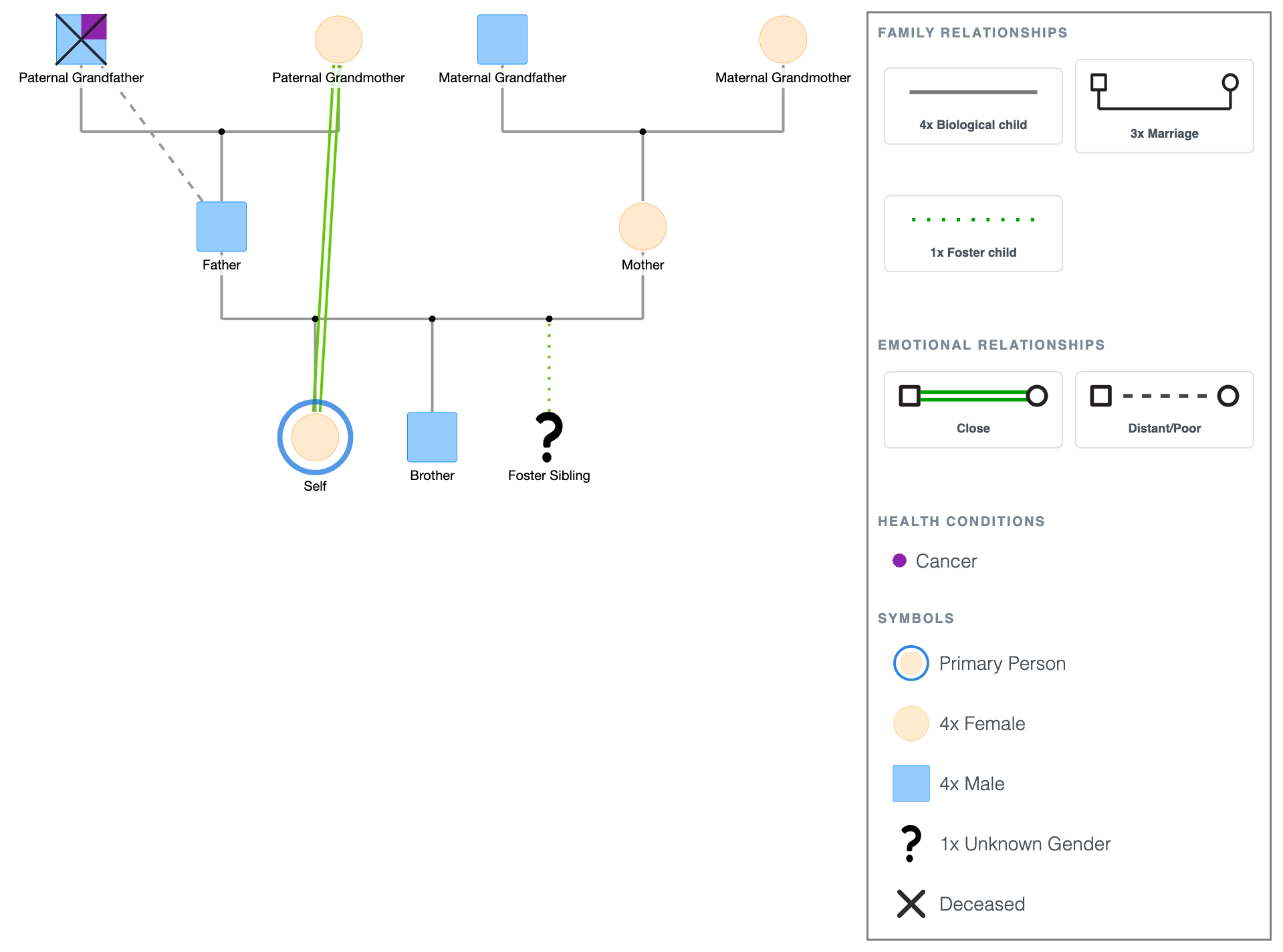
Three generations (grandparents, parents, and children) with structural lines covering marriage and biological and foster child relationships. A cancer marker sits on the paternal grandfather, who is deceased. Emotional lines show closeness between the primary person and her grandmother and distance between the father and his father.
The symbol legend is displayed below the diagram. For full definitions and clinical usage, see Genogram Symbols Explained.
When to Use This Template
- Canva-based reports and presentations: insert a properly notated genogram into a Canva report or slide design without building from scratch.
- Health or social work infographics: combine a completed genogram with other visual elements in a Canva layout for a presentation or publication.
- Academic posters and visual assignments: embed the genogram into a Canva poster design for coursework or conference presentations.
- Personal or family history projects: use the template as a starting point for a family history design built in Canva.
How to Use This Template
1. Download as-is
Click the PDF or PNG button under the embed to download immediately. Upload the PNG directly to Canva and place it in your design.
2. Customize and insert into Canva
Click "Use this genogram" to open the template in EasyGenogram. Add names, adjust the family structure, and update relationship lines and health markers to match the actual family.
Export as PNG when done.
In Canva, go to Uploads, upload the PNG file, drag it onto your canvas, and resize and reposition as needed.
For a full walkthrough of building a genogram from scratch using Canva's shape tools, see How to Make a Genogram in Canva.
Genogram Template for Canva
Explore this genogram and adapt it to your needs.
FAQ
Does Canva have a genogram template?
Canva has family tree templates but no standard genogram symbols and no clinical notation. To get a properly formatted genogram into Canva, build it in EasyGenogram, export as PNG, and upload it to your Canva design.
How do I insert a genogram into Canva?
Export your genogram as PNG from EasyGenogram, then go to Uploads in Canva, upload the file, and drag it onto your canvas. Resize and reposition to fit your design layout.
Can I build a genogram directly in Canva?
You can use Canva's shapes and lines to approximate a genogram, but Canva has no standard genogram symbols, no emotional relationship lines, and no clinical notation. For clinical or academic use, building in EasyGenogram and exporting as PNG gives you standard notation and a proper symbol legend automatically.
Is this genogram template free?
Yes. Open and customize it in EasyGenogram at no cost. Export requires a subscription for most users; students with a valid school email can export free.
What is the difference between a Canva genogram and an EasyGenogram genogram?
Canva uses general shapes and lines with no standard genogram symbols, no emotional relationship lines, and no automatic symbol legend. EasyGenogram uses McGoldrick-Gerson-Petry standard notation with built-in symbols for every relationship type, health markers, and an auto-generated legend. For clinical, academic, or social work use, EasyGenogram produces the correct output; Canva works for simple visual diagrams only.