Appearance
EasyGenogram vs Paper Genograms: Digital vs Hand-Drawn
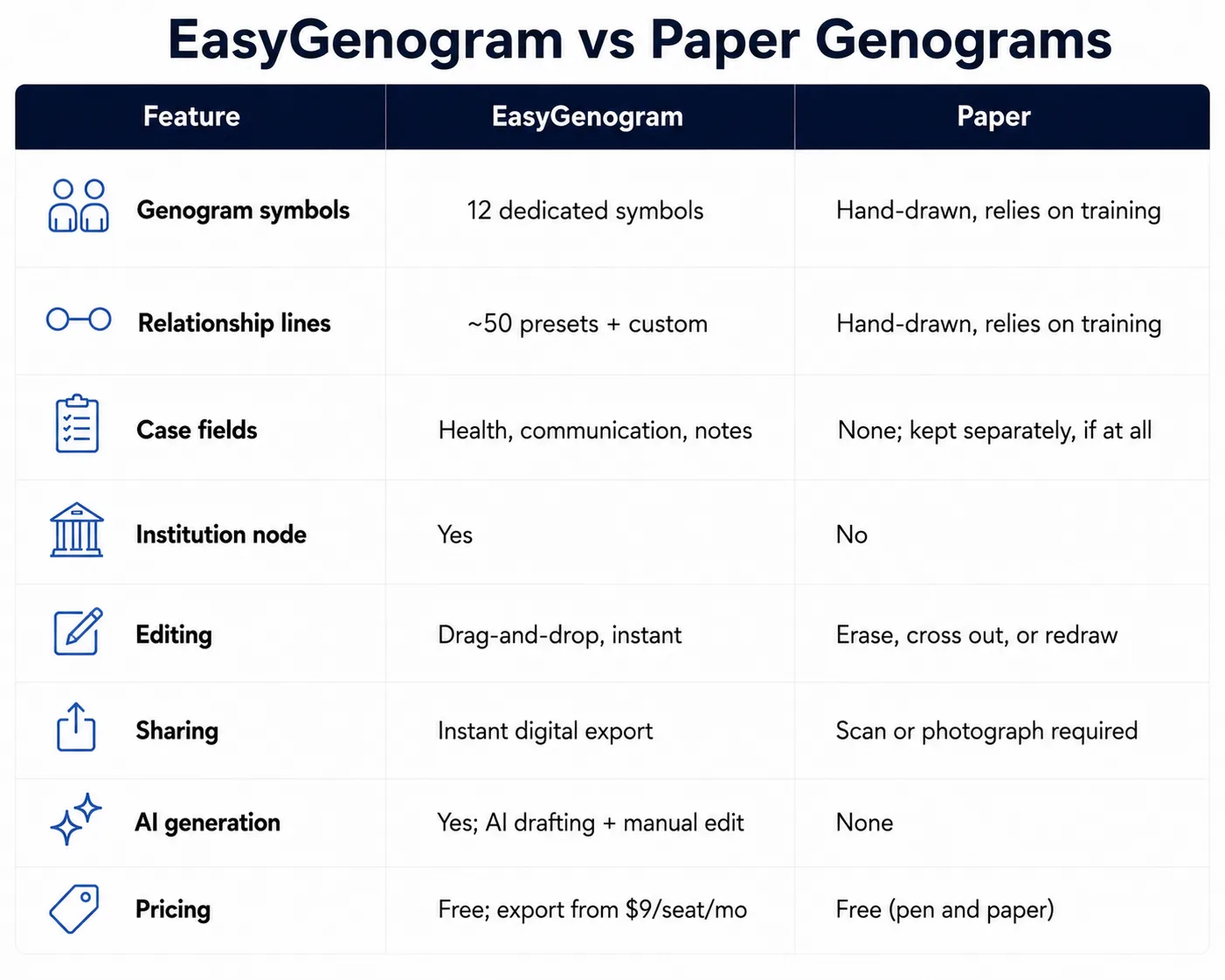
EasyGenogram is better for shareable, editable genograms, while paper is still useful for quick in-session sketches. This comparison explains when hand-drawn work supports the conversation and when a digital genogram tool is needed for accuracy, storage, updates, and export.
Where Paper Genograms Actually Work Well
- No screen between you and the client: Sketching by hand while someone talks keeps the conversation the focus.
- The standard way most people learn: Most training programs teach genogram symbols by hand first, before any software.
- Works anywhere, no login or device needed: Useful in home visits, intake rooms, or anywhere you don't have a laptop open.
- Immediate and tactile: No menus to navigate mid-conversation.
Where Paper Falls Short
- Mistakes mean erasing, crossing out, or starting over: there's no easy undoing.
- No clean way to share or store it: Scanning or photographing is the only path to a digital copy.
- Legibility depends entirely on handwriting: Notation quality varies person to person.
- Hard to update over time: As a family changes, the same paper genogram usually gets redrawn rather than edited.
- No structured case fields tied to the diagram: Health conditions, notes, and institutional involvement live separately, if at all.
What a Genogram Tool Should Actually Do
Here’s what EasyGenogram, a genogram-specific tool, does:
- Purpose-built symbols: Gender and relationship symbols plus a free-text Gender Identity field, so you're never boxed into a fixed list of options.
- A real relationship-line library: roughly 50 preset types across emotional, family, and children's connections, so relationship quality is visible at a glance instead of manually labeled.
- A custom connection builder: define your own line type when a preset doesn't fit, so unusual or specific dynamics don't get flattened into a generic line.
- AI drafting with manual editing: create a first draft from a plain-language description, refine it with more instructions, then edit the genogram directly, so you're never starting from a blank canvas.
- One-click family structure: add a parent, partner, child, sibling, or connection directly from a selected person, so building out a family takes seconds instead of individual placement.
- An Institution node: a dedicated symbol for CPS, court, school, or agency involvement, so a case file shows outside-system involvement clearly.
- Structured clinical fields: Health Conditions and Sexual Communication as named fields, so details stay consistent across a caseload instead of scattered across notes.
Quick Comparison
When Should You Use Paper?
- You're sketching live with a client and want the conversation to stay the focus, not a screen.
- You're a student or trainee learning standard genogram symbols for the first time.
- No device is available at the moment; a home visit, an intake room, a hallway conversation.
When Should You Use EasyGenogram?
- The genogram needs to become part of a shareable case file or client record.
- You're updating the same family's genogram over multiple sessions as things change.
- You want structured case fields tied directly to the diagram, not tracked separately.
Which Should You Use: EasyGenogram or Paper?
Most practitioners end up using both; paper in the room while talking with a client, then EasyGenogram to turn it into a clean, shareable, updatable record afterward.
Neither fully replaces the other; they serve different moments in the same workflow.
Build your genogram using EasyGenogram.
FAQ
Is it okay to draw a genogram by hand?
Yes. It's how most people learn genogram notation in the first place, and it still works well for sketching live during a session.
How do I turn a hand-drawn genogram into a digital one?
Rebuild it using the same structure and notation in a tool built for genograms. Once it's digital, it's editable and shareable going forward, instead of needing to be redrawn or rescanned every time it changes.
Is EasyGenogram free to use?
Yes. Building and editing a genogram is free. Exporting requires a paid plan starting at $9/seat/month, with a 7-day free trial, but it's totally free for students.
Do hand-drawn genograms follow the same standard symbols?
Yes, if you know them. Paper just doesn't provide a built-in reference the way a digital tool does, so accuracy depends on how well you know the notation.
Which is better for teaching students the notation?
Paper, for learning the symbols by hand first. Digital tools make more sense once it's time to build real, shareable case records.