Appearance
EasyGenogram vs Google Docs: Why the Drawing Tool Isn't a Genogram Tool
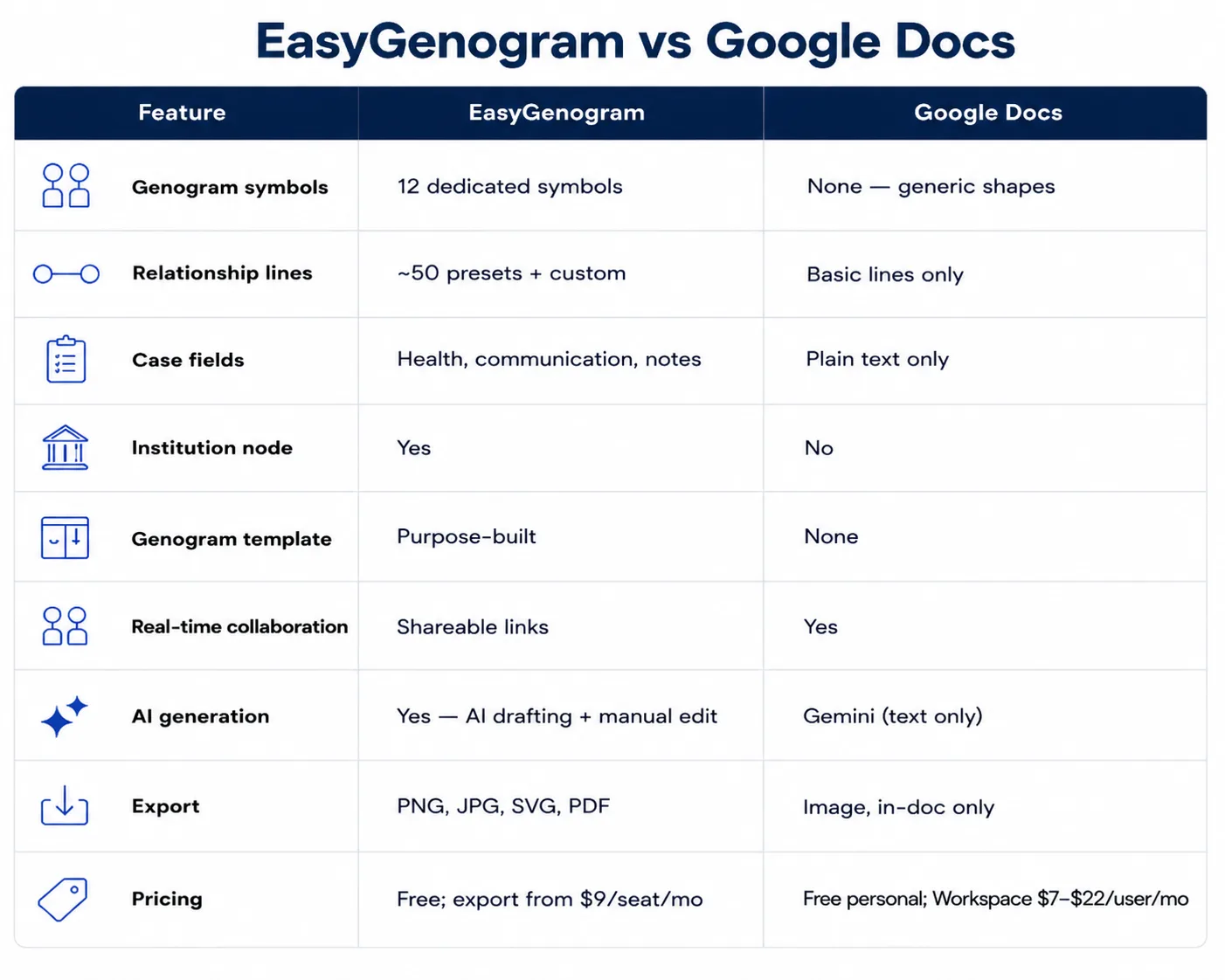
EasyGenogram is better than Google Docs for building a genogram because it provides symbols, relationship-line notation, and an actual family-mapping canvas. Google Docs can hold a finished image inside a report, but its Drawing tool is too generic for accurate genogram creation.
The Problems With Building a Genogram in Google Docs
- **No genogram symbols:**The Drawing tool gives you generic shapes; every square and circle is placed and labeled by hand.
- No relationship-line notation: Close, distant, fused, cutoff, hostile, abuse; none of these exist as line types, only the Drawing tool's standard lines and arrows.
- The Drawing tool isn't a diagramming canvas: It's a small pop-up editor meant for quick illustrations dropped into a document, not for building or editing a detailed family structure.
- No structured case fields: Health conditions, case notes, institutional involvement all live in plain text with no consistent format from one genogram to the next.
- Slow by design: Every person, line, and label is placed one at a time. There's no one-click way to add a sibling, a divorce, or a foster placement.
Quick Comparison
What a Genogram Tool Should Actually Do
Here’s what EasyGenogram, a genogram-specific tool, does:
- Purpose-built symbols: Gender and relationship symbols plus a free-text Gender Identity field, so you're never boxed into a fixed list of options.
- A real relationship-line library: roughly 50 preset types across emotional, family, and children's connections, so relationship quality is visible at a glance instead of manually labeled.
- A custom connection builder: define your own line type when a preset doesn't fit, so unusual or specific dynamics don't get flattened into a generic line.
- AI drafting with manual editing: create a first draft from a plain-language description, refine it with more instructions, then edit the genogram directly, so you're never starting from a blank canvas.
- One-click family structure: add a parent, partner, child, sibling, or connection directly from a selected person, so building out a family takes seconds instead of individual placement.
- An Institution node: a dedicated symbol for CPS, court, school, or agency involvement, so a case file shows outside-system involvement clearly.
- Structured clinical fields: Health Conditions and Sexual Communication as named fields, so details stay consistent across a caseload instead of scattered across notes.
When Should You Use Google Docs?
- The genogram is a small piece of a larger report or case note you're already writing in Docs, not a standalone document.
- You only need a rough visual, and you're fine dropping in a finished image rather than building it natively.
- Your team is already collaborating on the document itself and just needs a simple visual reference inside it.
When Should You Use EasyGenogram?
- Genograms are a regular part of your work; intake sessions, case documentation, family assessments.
- The diagram needs to function as a clean, standalone document, not just an illustration inside a report.
- You want the notation built in, instead of manually placing and labeling shapes in a drawing panel that wasn’t built for genograms.
Which Should You Use: EasyGenogram or Google Docs?
For anything that needs to work as a real clinical or casework document, EasyGenogram is the clear choice; the notation already exists.
Google Docs only makes sense for dropping a finished genogram image into a document you're already writing, and building it in EasyGenogram first is faster and more accurate than assembling it by hand in the Drawing tool.
Build your genogram with EasyGenogram.
FAQ
Does Google Docs have a genogram template?
No. There's no built-in genogram template in Google Docs. Genograms have to be built manually using the Drawing tool's generic shapes. You can easily use EasyGenogram’s template, however, export it and insert it into your document.
Can I build a genogram for free in Google Docs?
Yes, using the Drawing tool, but it’s stressful because shapes have to be placed and connected manually with no genogram-specific symbols or relationship-line notation.
Is EasyGenogram free to use?
Yes. Building and editing a genogram is free. Exporting requires a paid plan starting at $9/seat/month, with a 7-day free trial, but it's totally free for students.
Does Gemini in Google Docs create genogram diagrams?
No. Gemini in Docs is a writing assistant for drafting and polishing text; it doesn't generate diagrams, and the Drawing tool has no AI diagram generation of its own.
Which is better for casework or clinical documentation, EasyGenogram or Google Docs?
EasyGenogram, because it's built for clinical and casework use. Google Docs only fits if you need the genogram embedded inside a document you're already writing collaboratively.